Temporal API vs Date: Your Server Still Thinks It's Tomorrow
 Samuel Santana
In October I wrote here about a React #418 error that only showed up after 9 PM: the server, running in UTC, was already in the next day and wrote a date into the HTML that the browser didn't recognize. The fix was a hook built on useSyncExternalStore that returns null on the server.
Temporal has shipped in Node 26, enabled by default, and it's tempting to read that bug as one more flaw of Date. I tested it. On November 2, at 9:45 PM in Brasília, I ran the same "today" calculation on Node 26.13.0 with the process in two time zones (the script's labels are in Portuguese; the code is the one that ran):
// TZ=UTC node now-system-tz.mjs   and   TZ=America/Sao_Paulo node now-system-tz.mjs
function getCurrentDate() {
  // the function from the #418 post: the local day of whoever runs it
  const now = new Date();
  return `${now.getFullYear()}-${String(now.getMonth() + 1).padStart(2, "0")}-${String(now.getDate()).padStart(2, "0")}`;
}

console.log("TZ do processo:          ", Temporal.Now.timeZoneId());
console.log("instante:                ", Temporal.Now.instant().toString({ smallestUnit: "second" }));
console.log("getCurrentDate() (Date): ", getCurrentDate());
console.log("Temporal.Now.plainDateISO():", Temporal.Now.plainDateISO().toString());
console.log("plainDateISO('America/Sao_Paulo'):", Temporal.Now.plainDateISO("America/Sao_Paulo").toString());
### node 26.13.0, TZ=UTC
TZ do processo:           UTC
instante:                 2026-11-03T00:45:44Z
getCurrentDate() (Date):  2026-11-03
Temporal.Now.plainDateISO(): 2026-11-03
plainDateISO('America/Sao_Paulo'): 2026-11-02
### node 26.13.0, TZ=America/Sao_Paulo
TZ do processo:           America/Sao_Paulo
instante:                 2026-11-03T00:45:45Z
getCurrentDate() (Date):  2026-11-02
Temporal.Now.plainDateISO(): 2026-11-02
plainDateISO('America/Sao_Paulo'): 2026-11-02
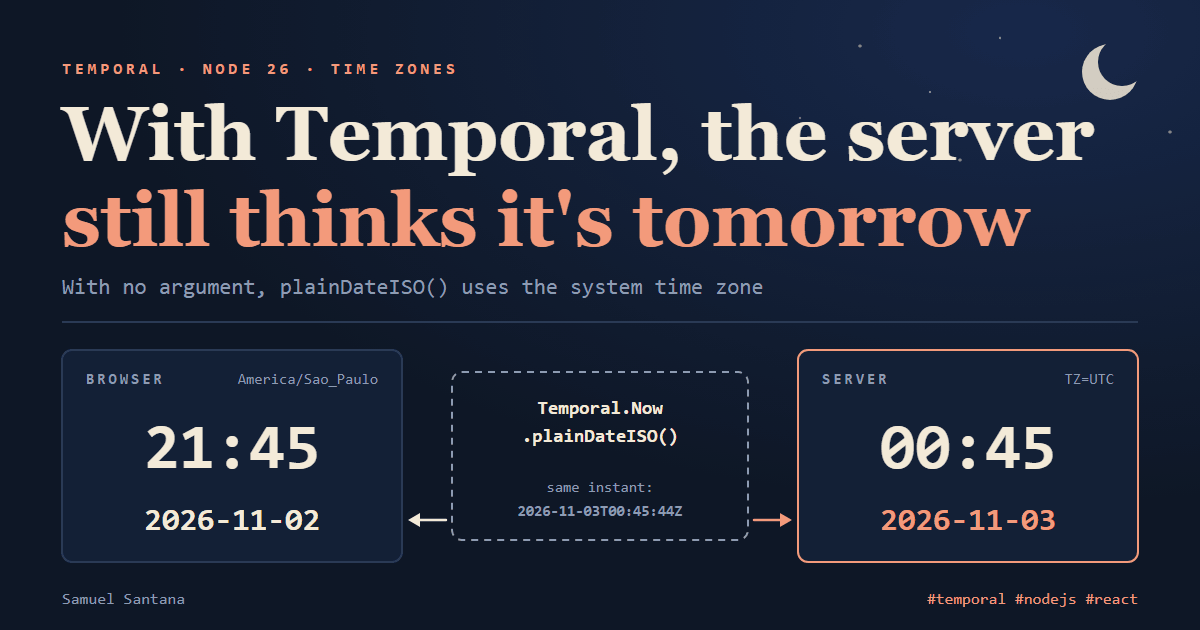
With the process in UTC, Temporal.Now.plainDateISO() answered November 3, same as Date. It's the same bug with a new API, and the Temporal documentation says so plainly: without the argument, it uses the system time zone. No API running on the server knows what day it is for the person on the other side of the screen.
For #418, switching APIs changes nothing. What changes is where the time zone shows up. In Date, it hides in each method name (getDate() is local, getUTCDate() is UTC, toISOString() is UTC). In Temporal, it lives in the type, and that's what removes the other date bugs in this post.
Temporal Types and the Time Zone
Temporal splits into types what Date packs into a single millisecond count:
| Type | Represents | Example |
|---|---|---|
Temporal.Instant | a point on the timeline, no calendar, no time zone | 2026-09-26T00:50:00Z |
Temporal.ZonedDateTime | an instant seen in a named time zone | 2026-09-25T21:50:00-03:00[America/Sao_Paulo] |
Temporal.PlainDate | a calendar day, no time, no time zone | 2026-09-25 |
Temporal.PlainDateTime | wall-clock date and time, no time zone | 2026-09-25T21:50:00 |
And the Date calls that come up most, with the equivalent I ran on Node 26 (ms is a millisecond count, zdt a ZonedDateTime):
With Date | With Temporal |
|---|---|
new Date() | Temporal.Now.instant() |
today's date via getFullYear(), getMonth(), getDate() | Temporal.Now.plainDateISO(timeZone) |
date.getDate() | zdt.day (the day in zdt's time zone, not the process's) |
date.toISOString() | instant.toString() |
date.getTime() / new Date(ms) | instant.epochMilliseconds / Temporal.Instant.fromEpochMilliseconds(ms) |
new Date("2026-09-25") | Temporal.PlainDate.from("2026-09-25") |
d.setDate(d.getDate() + 1) | zdt.add({ days: 1 }) |
d.setMonth(d.getMonth() + 1) | plainDate.add({ months: 1 }) |
a.getTime() === b.getTime() | a.equals(b) |
dates.sort((a, b) => a - b) | dates.sort(Temporal.PlainDate.compare) |
date.toLocaleDateString("en-US") | plainDate.toLocaleString("en-US") |
from Date to Temporal | date.toTemporalInstant() |
from Temporal to Date | new Date(instant.epochMilliseconds) |
In #418, the field in the expense drawer is, at heart, a PlainDate. "What day is today" is a conversion from an Instant (now) to a PlainDate, and that conversion only exists given a time zone. Temporal lets the time zone appear in the call, Temporal.Now.plainDateISO("America/Sao_Paulo"), but it doesn't pick the right one for you. Pinning Brasília on the server is the same tempting fix the October post ruled out: it's wrong for everyone who isn't in Brasília. The difference is that, written this way, the mistake sits on a line someone reads in the pull request instead of living in the machine's TZ.
The Date Pitfalls Temporal Fixes
Everything below ran on Node 26.13.0. I ran the same scripts on Node 24.19.0 with temporal-polyfill and got the same values; only the error message wording changes.
"2026-09-25" Is Midnight UTC
// TZ=America/Sao_Paulo node date-only.mjs
const d = new Date("2026-09-25");                    // date only: JavaScript reads it as midnight UTC
console.log(d.toISOString());
console.log(d.toLocaleDateString("pt-BR"));

const local = new Date("2026-09-25T00:00");          // date and time without offset: that one is local time
console.log(local.toISOString());

const day = Temporal.PlainDate.from("2026-09-25");   // a calendar day, no time, no time zone
console.log(day.toString(), day.toLocaleString("pt-BR"));
2026-09-25T00:00:00.000Z
24/09/2026
2026-09-25T03:00:00.000Z
2026-09-25 25/09/2026
The rule is in the specification: without an offset, the date-only form is read as UTC, and the date-time form is read as local time. In Brasília, midnight UTC on September 25 is 9 PM on the 24th, and the 24th is what shows up on screen (pt-BR prints day/month). The value of an <input type="date"> has exactly that format; pass it through new Date() and it becomes the previous day in any time zone with a negative offset, which is all of the Americas.
Adding a Day Is Not Adding 24 Hours
On Sunday, November 1, 2026, New York set its clocks back an hour: that day had 25 hours. A server scheduling "same time tomorrow" for someone there:
// TZ=UTC node dst.mjs   and   TZ=America/New_York node dst.mjs
// Saturday, 10/31/2026, 9 AM in New York. "Same time tomorrow" lands on 11/01, the day the clocks go back an hour.
const d = new Date("2026-10-31T09:00:00-04:00");
d.setDate(d.getDate() + 1);
console.log("Date.setDate(+1):  ", d.toLocaleString("en-US", { timeZone: "America/New_York" }));

const meeting = Temporal.ZonedDateTime.from("2026-10-31T09:00[America/New_York]");
console.log("add({ days: 1 }):  ", meeting.add({ days: 1 }).toString());
console.log("add({ hours: 24 }):", meeting.add({ hours: 24 }).toString());
console.log("horas em 01/11:    ", meeting.add({ days: 1 }).hoursInDay);
### dst, TZ=UTC
Date.setDate(+1):   11/1/2026, 8:00:00 AM
add({ days: 1 }):   2026-11-01T09:00:00-05:00[America/New_York]
add({ hours: 24 }): 2026-11-01T08:00:00-05:00[America/New_York]
horas em 01/11:     25
### dst, TZ=America/New_York
Date.setDate(+1):   11/1/2026, 9:00:00 AM
add({ days: 1 }):   2026-11-01T09:00:00-05:00[America/New_York]
add({ hours: 24 }): 2026-11-01T08:00:00-05:00[America/New_York]
horas em 01/11:     25
setDate adds a day in the process's time zone. With the server in New York, the meeting stays at 9 AM; with the server in UTC (or in São Paulo, which also gave 8 AM), it slides to 8 AM. The same code gives two answers, and which one you get depends on where it runs. In a ZonedDateTime, the time zone travels with the value: add({ days: 1 }) is the same wall-clock time the next day, add({ hours: 24 }) is exactly 24 hours later, and the two operations have different names.
The example is in New York because Brazil hasn't had daylight saving time since Decree 9,772/2019. The tzdata bundled with Node 26.13.0 confirms there's no transition in São Paulo after February 2019:
// The last America/Sao_Paulo transition in Node's tzdata
const before = Temporal.ZonedDateTime.from("2019-01-01T12:00[America/Sao_Paulo]");
console.log(process.versions.tz, before.getTimeZoneTransition("next")?.toString());
console.log(process.versions.tz, before.add({ months: 3 }).getTimeZoneTransition("next"));
2026e 2019-02-16T23:00:00-03:00[America/Sao_Paulo]
2026e null
That gives a rule that holds with or without Temporal: store the time zone name (America/Sao_Paulo), not the offset (-03:00). If DST comes back, tzdata changes and the name follows; an offset saved in the database goes silently wrong.
January 31 Plus One Month
// node month-end.mjs
const d = new Date(2026, 0, 31);
d.setMonth(d.getMonth() + 1);
console.log("Date:     ", d.toDateString());

const jan31 = Temporal.PlainDate.from("2026-01-31");
console.log("constrain:", jan31.add({ months: 1 }).toString());
console.log("ida/volta:", jan31.add({ months: 1 }).subtract({ months: 1 }).toString());
try {
  jan31.add({ months: 1 }, { overflow: "reject" });
} catch (e) {
  console.log("reject:   ", `${e.name}: ${e.message}`);
}
Date:      Tue Mar 03 2026
constrain: 2026-02-28
ida/volta: 2026-01-28
reject:    RangeError: Temporal error: not a valid ISO date.
Date accepts February 31 and overflows into March 3 without a word. Temporal, by default (overflow: "constrain"), stops at the last day of the month; with overflow: "reject", it throws. The middle line (ida/volta, there and back) is the one that bites anyone computing due dates: adding and then subtracting a month doesn't return to the start, because the 31st became the 28th along the way. In the polyfill, the RangeError message is different ("Invalid day: 31; must be between 1-28"), so don't test against the text.
Comparing and Sorting
Temporal changes less here. === still compares references in both: two equal PlainDates give false, no error. The difference is < and >: on Date they work through numeric coercion; on Temporal they throw TypeError, so comparison has to be explicit, with equals and compare (which also works as the sort callback):
// node compare.mjs
console.log(new Date(0) === new Date(0), new Date(0) < new Date(1));

const a = Temporal.PlainDate.from("2026-09-25");
const b = Temporal.PlainDate.from("2026-09-25");
console.log(a === b, a.equals(b), Temporal.PlainDate.compare(a, b));
try {
  a < b;
} catch (e) {
  console.log(`${e.name}: ${e.message}`);
}

const dates = ["2026-10-02", "2026-09-25", "2026-09-18"].map((s) => Temporal.PlainDate.from(s));
console.log(dates.sort(Temporal.PlainDate.compare).join(" "));

const ny = Temporal.ZonedDateTime.from("2026-11-01T09:00[America/New_York]");
const sp = ny.withTimeZone("America/Sao_Paulo");
console.log(ny.equals(sp), Temporal.ZonedDateTime.compare(ny, sp), ny.toInstant().equals(sp.toInstant()));
false true
false true 0
TypeError: Do not use Temporal.PlainDate.prototype.valueOf; use Temporal.PlainDate.prototype.compare for comparison.
2026-09-18 2026-09-25 2026-10-02
false 0 true
The last line has a catch: two ZonedDateTimes at the same instant, in different time zones, are not equals (the time zone is part of the value), but compare returns 0. If what you care about is the instant, compare the Instants.
JSON Round Trip
Each type serializes to the ISO string that represents it, which already beats Date, which turns a calendar day into a UTC instant. The way back is unchanged: JSON.parse returns strings, and the type is lost over the wire.
// node json.mjs
const json = JSON.stringify({
  day: Temporal.PlainDate.from("2026-09-25"),
  at: Temporal.Instant.from("2026-09-26T00:50:00Z"),
  meeting: Temporal.ZonedDateTime.from("2026-11-01T09:00[America/New_York]"),
  legacy: new Date("2026-09-26T00:50:00Z"),
});
console.log(json);

const back = JSON.parse(json);
console.log(typeof back.day, typeof back.legacy);
console.log(new Date(back.meeting).getTime());       // Date doesn't understand [America/New_York]
console.log(Temporal.ZonedDateTime.from(back.meeting).toString());

const revived = JSON.parse(json, (key, value) => (key === "day" ? Temporal.PlainDate.from(value) : value));
console.log(revived.day instanceof Temporal.PlainDate);
{"day":"2026-09-25","at":"2026-09-26T00:50:00Z","meeting":"2026-11-01T09:00:00-05:00[America/New_York]","legacy":"2026-09-26T00:50:00.000Z"}
string string
NaN
2026-11-01T09:00:00-05:00[America/New_York]
true
Rebuilding happens on arrival, with a reviver or with the schema that validates the payload. And the [America/New_York] suffix of a ZonedDateTime is unknown to anything that doesn't speak Temporal: new Date() returns an invalid date, and Postgres rejects it (see the database section). For an API other systems consume, I'd send the Instant and the time zone name in separate fields.
Date and Intl at the Boundary
Libraries that return Date will keep existing. Converting is direct, and I ran it with the process in São Paulo to see what each side does with the time zone:
// TZ=America/Sao_Paulo node interop.mjs
const legacy = new Date("2026-09-26T00:50:00Z");            // what comes out of an older library
const instant = legacy.toTemporalInstant();
const inSaoPaulo = instant.toZonedDateTimeISO("America/Sao_Paulo");
console.log(instant.toString(), inSaoPaulo.toPlainDate().toString());
console.log(new Date(inSaoPaulo.epochMilliseconds).toISOString()); // and back to Date

const long = new Intl.DateTimeFormat("pt-BR", { dateStyle: "long" });
console.log("Date:     ", long.format(new Date("2026-09-25")));
console.log("PlainDate:", long.format(Temporal.PlainDate.from("2026-09-25")));
console.log(inSaoPaulo.toLocaleString("pt-BR", { dateStyle: "short", timeStyle: "short" }));
for (const [label, fn] of [
  ["format(ZonedDateTime)", () => long.format(inSaoPaulo)],
  ["timeStyle com PlainDate", () => new Intl.DateTimeFormat("pt-BR", { timeStyle: "short" }).format(inSaoPaulo.toPlainDate())],
]) {
  try {
    console.log(label, fn());
  } catch (e) {
    console.log(`${label}: ${e.name}: ${e.message}`);
  }
}
2026-09-26T00:50:00Z 2026-09-25
2026-09-26T00:50:00.000Z
Date:      24 de setembro de 2026
PlainDate: 25 de setembro de 2026
25/09/2026, 21:50
format(ZonedDateTime): TypeError: Invalid argument for Temporal [object Temporal.ZonedDateTime]
timeStyle com PlainDate: TypeError: Invalid argument for Temporal [object Temporal.PlainDate]
The same formatter, in the same process in São Paulo, prints September 24 for the Date and September 25 for the PlainDate: Intl.DateTimeFormat applies the time zone to a Date and applies none to a PlainDate (in America/Los_Angeles the output was the same). It rejects a ZonedDateTime; for that one, use toLocaleString, which formats in the value's own time zone. And a formatter with timeStyle rejects a PlainDate, because there's no time to show. Date.prototype.toTemporalInstant() exists in Node 26 and in the three browsers I tested.
Postgres: date, timestamp and timestamptz
The other boundary is the database. On a local PostgreSQL 18.6, I wrote one row with the three date columns:
create table if not exists eventos (dia date, sem_fuso timestamp, com_fuso timestamptz);
insert into eventos values ('2026-09-25', '2026-09-25 21:50:00', '2026-09-25 21:50:00-03:00');
And read the same row with three drivers, changing only the Node process's TZ:
TZ do processo Node: UTC
postgres 4.0.0   date=2026-09-25T00:00:00.000Z  timestamp=2026-09-25T21:50:00.000Z  timestamptz=2026-09-26T00:50:00.000Z
postgres 3.4.9   date=2026-09-25T00:00:00.000Z  timestamp=2026-09-25T21:50:00.000Z  timestamptz=2026-09-26T00:50:00.000Z
pg 8.23.1        date=2026-09-25T00:00:00.000Z  timestamp=2026-09-25T21:50:00.000Z  timestamptz=2026-09-26T00:50:00.000Z
TZ do processo Node: America/Sao_Paulo
postgres 4.0.0   date=2026-09-25T00:00:00.000Z  timestamp=2026-09-25T21:50:00.000Z  timestamptz=2026-09-26T00:50:00.000Z
postgres 3.4.9   date=2026-09-25T00:00:00.000Z  timestamp=2026-09-26T00:50:00.000Z  timestamptz=2026-09-26T00:50:00.000Z
pg 8.23.1        date=2026-09-25T03:00:00.000Z  timestamp=2026-09-26T00:50:00.000Z  timestamptz=2026-09-26T00:50:00.000Z
Only timestamptz is the same instant on every line, because only it is an instant. timestamp has no time zone, and the driver picks one when turning it into a Date: postgres 4.0.0, released October 29, reads it as UTC (its new README says so); 3.4.9 and pg read it in the process's time zone, and in São Paulo the same value becomes an instant three hours later. The date column becomes midnight UTC in postgres (the same September 24 from the "2026-09-25" section, when displayed in Brasília) and local midnight in pg. Upgrading the driver, or changing the container's TZ, changes what the code reads from the same database.
With Temporal, each column becomes the type it is. In pg, the mapping is by OID and applies to every connection in the process (excerpt):
pg.types.setTypeParser(1082, (x) => Temporal.PlainDate.from(x));     // date
pg.types.setTypeParser(1114, (x) => Temporal.PlainDateTime.from(x)); // timestamp
pg.types.setTypeParser(1184, (x) => Temporal.Instant.from(x));       // timestamptz
In postgres, through the types option, registering only parse (excerpt):
const typed = postgres(url, {
  types: {
    date: { from: [1082], parse: (x) => Temporal.PlainDate.from(x) },
    timestamp: { from: [1114], parse: (x) => Temporal.PlainDateTime.from(x) },
    timestamptz: { from: [1184], parse: (x) => Temporal.Instant.from(x) },
  },
});
Registering to and serialize for OID 1184 as well would change how the driver sends any Date parameter, so I kept reading only. With postgres 4.0.0 and pg, with the process in UTC and in São Paulo, the output was the same: PlainDate 2026-09-25, PlainDateTime 2026-09-25T21:50:00, Instant 2026-09-26T00:50:00Z. Temporal.Instant.from accepts Postgres's text format (2026-09-26 00:50:00+00, with a space and a short offset) as is.
Going in needs a different kind of care. I sent three versions of the New York meeting (9 AM, November 1), converted with toString(), as the parameter of a select $1::timestamptz:
Instant        ok  2026-11-01T14:00:00Z
PlainDateTime  ok  2026-11-01T09:00:00Z
ZonedDateTime  erro: invalid input syntax for type timestamp with time zone: "2026-11-01T09:00:00-05:00[America/New_York]"
The Instant arrived correctly. The PlainDateTime was accepted and became 9 AM UTC, five hours before the meeting: with no time zone in the value, Postgres used the session's TimeZone. The ZonedDateTime was rejected because of the time zone name suffix. For a timestamptz column, always send an Instant: zdt.toInstant() for a ZonedDateTime, and pdt.toZonedDateTime(timeZone).toInstant() for a PlainDateTime, which has to get its time zone first (with "America/New_York", it gave 2026-11-01T14:00:00Z).
Where Temporal Runs (November 2, 2026)
Temporal reached stage 4 at TC39 in March 2026 and is slated for ES2027. Support:
| Environment | Temporal | Source |
|---|---|---|
| Node 24.19.0 | no; --harmony-temporal turns on an old version | tested |
| Node 26 | yes, since 26.0.0 (May 5); 26.13.0 has been LTS since October 28 | 26.0.0 notes, tested 26.13.0 |
| Chrome and Edge | 144 and later | Chrome 144 notes, MDN data |
| Firefox | 139 and later | Firefox 139 notes |
| Safari 27.2 (macOS and iOS) | no | Safari 27.2 notes, caniuse |
| Safari Technology Preview | yes, since 249 | STP 249 notes |
On Node 24, the V8 flag exists and typeof Temporal becomes "object", but the API it exposes comes from an old draft: it has Temporal.TimeZone, Temporal.Calendar and Temporal.Now.timeZone(), which were dropped from the proposal, and it lacks Temporal.Now.timeZoneId(). Code written for Node 26 breaks there; the first script in this post stops at its first line:
TypeError: Temporal.Now.timeZoneId is not a function
On my 43-case suite (the examples in this post plus a few more), the flag passed 36.
The WebKit that Playwright 1.64.1 downloads (webkit-2370, user agent Version/27.2 Safari/605.1.15) has native Temporal and passed all 43 cases. Safari 27.2, released October 26, doesn't have it. A green run in Playwright's webkit project tells you the WebKit engine handles your code; it doesn't tell you your users' Safari has the API. I didn't run anything on a real Safari.
Polyfill Only Where Temporal Is Missing
Until Safari ships Temporal, browser code needs a polyfill:
npm install temporal-polyfill
I compared two packages, in an esbuild 0.28.2 bundle (--bundle --minify --format=esm) whose entry imports the package and calls Temporal.Now.plainDateISO():
| Package | Version (date) | Minified | gzip | brotli |
|---|---|---|---|---|
@js-temporal/polyfill | 0.5.1 (2025-03-31) | 162.1 kB | 47.1 kB | 40.7 kB |
temporal-polyfill/global | 1.0.6 (2026-10-13) | 59.2 kB | 20.6 kB | 18.5 kB |
temporal-polyfill (no global) | 1.0.6 | 56.9 kB | 19.8 kB | 17.9 kB |
temporal-polyfill/full/global (all calendars) | 1.0.6 | 68.6 kB | 24.5 kB | 22.0 kB |
On the 43-case suite, on Node 24.19.0, temporal-polyfill/global passed every case with the code exactly as it runs on Node 26: it installs Temporal, patches Intl.DateTimeFormat and adds Date.prototype.toTemporalInstant. @js-temporal/polyfill installs nothing globally and ships its own Intl: it passed every case when the suite used the Intl.DateTimeFormat exported by the package, and failed the two cases that format a PlainDate when it used the global Intl (TypeError). Given the size and the fact that it's maintained (the latest @js-temporal/polyfill release is from March 2025), my pick is temporal-polyfill.
Loading It Only When Needed
Those 20 kB don't need to reach browsers that already have Temporal. The pattern is a module that loads the polyfill only when the global is missing:
// temporal.js: import this file once, before any code that uses Temporal.
if (typeof globalThis.Temporal === "undefined") {
  await import("temporal-polyfill/global");
}
node v24.19.0: Temporal do polyfill, hoje = 2026-11-02
node v26.13.0: Temporal nativo, hoje = 2026-11-02
The top-level await makes modules that import temporal.js, directly or indirectly, wait, and nobody else. I tested on Node 24 an entry point that imports temporal.js first and then two modules that read typeof Temporal at their top level: the one that also imports temporal.js saw the polyfill; the one that doesn't ran before it arrived.
sibling.mjs: undefined
dependent.mjs: object
main.mjs: object
So: every module that uses Temporal at its own top level imports temporal.js; the rest can use Temporal inside functions called after the entry point has finished loading. In the browser, esbuild with --splitting put the polyfill in a separate chunk (59.1 kB minified) and left the entry at 0.1 kB.
On Node 24 with --harmony-temporal, this check is fooled: typeof Temporal isn't "undefined", the polyfill doesn't load, and the code gets the old API. temporal-polyfill/global also defers to whatever native implementation it finds, and with that flag on, Temporal.Now.timeZoneId stayed undefined. Don't turn that flag on.
Types
With TypeScript 6 or later and "lib": ["esnext"], the types already ship in TypeScript's own lib.esnext.temporal.d.ts (I tested with 7.0.2). In a project with an older lib, Temporal doesn't exist for the compiler (Cannot find name 'Temporal'), and importing temporal-polyfill/global doesn't fix it: that entry's global.d.ts is empty. The types live under another path in the package, and one declaration file does it:
// temporal-types.d.ts
import "temporal-polyfill/types/global";
With "lib": ["es2024", "dom"] and that file, TypeScript 7.0.2 knew about Temporal.PlainDate and flagged only the error I had planted on purpose.
In Next.js
I tested on a minimal Next.js 16.4.4 app (next build and next start). The place is instrumentation-client.js, which runs in the browser before hydration. The Next docs warn that only synchronous top-level code in that file finishes before hydration; an import() or await is fire-and-forget. I measured both forms, with Playwright delaying the file that carries the polyfill by 2 seconds and a WebKit without Temporal:
### instrumentation-client.js com import estático (porta 3998), atraso 2000
atraso 2000 ms | webkit*   botão="02/11/2026" polyfill carregado=false chunk pedido=true erros=0
### instrumentation-client.js com await import() condicional (porta 3999), atraso 2000
atraso 2000 ms | webkit*   botão="(sem #today; body: This page couldn’t load
With the conditional await import(), the component ran before the polyfill and the page broke (Can't find variable: Temporal); without the delay it worked, which only makes the failure rarer. With the static import (first block, "import estático"), it worked in all four browsers:
// instrumentation-client.js: runs in the browser before application code.
// The polyfill uses native Temporal when it exists.
import "temporal-polyfill/global";
The cost is that every visitor downloads the polyfill: the initial page JS went from 175.1 kB to 193.6 kB (gzip). To load it only where it's missing, the conditional loading has to live in the code that uses Temporal, not in that file. This is about the browser; the Next server runs on Node, and Node 26 needs nothing.
Reproducing #418 with Temporal
For anyone rendering on the server, I built a minimal reproduction: the HTML comes from renderToString on Node 26 with TZ=UTC, and hydration happens in Playwright 1.64.1's Chromium, Firefox and WebKit, all three set to America/Sao_Paulo. The component is the one from the original bug, swapping Date for Temporal (excerpt):
const label = (iso) => (iso ? Temporal.PlainDate.from(iso).toLocaleString("pt-BR") : "");

// The same thing with Temporal: Temporal.Now.plainDateISO() in the initial state.
function TemporalInState() {
  const [date] = useState(() => Temporal.Now.plainDateISO().toString());
  return <button>{label(date)}</button>;
}
Shortly before 10 PM on November 2, React reported the mismatch in all three browsers. This is the development build's output in Chromium (dates in day/month format):
Hydration failed because the server rendered text didn't match the client. ...

  <App variant="TemporalIn...">
    <TemporalInState>
      <button>
+       02/11/2026
-       03/11/2026
The + is the browser; the -, the server. It's the same line as in the October post, with a different date.
useToday with Temporal
The hook from the October post, rewritten:
"use client";

import { useMemo, useSyncExternalStore } from "react";

// There's nothing to listen to: the value is read again on every render, which is enough for a date.
function subscribe() {
  return () => {};
}

const onServer = () => null;

// The snapshot is still a string: React compares reads with Object.is.
const getToday = () => Temporal.Now.plainDateISO().toString();

/** Today in the browser's time zone, or null while the server renders and the page hydrates. */
export function useToday(): Temporal.PlainDate | null {
  const iso = useSyncExternalStore(subscribe, getToday, onServer);
  return useMemo(() => (iso === null ? null : Temporal.PlainDate.from(iso)), [iso]);
}
The getCurrentDate() with padStart is gone: plainDateISO().toString() already returns 2026-11-02. The return type went from string | null to Temporal.PlainDate | null, so the compiler knows it's a day and not an instant. With TypeScript 7.0.2 and "lib": ["esnext"], a component that tries to read the time from that value, or pass a PlainDateTime where a PlainDate is expected, doesn't compile:
import { useToday } from "./use-today";

export function Label() {
  const today = useToday();
  if (!today) return "";
  today.getHours();                         // a PlainDate has no time
  const d: Temporal.PlainDate = Temporal.Now.plainDateTimeISO(); // and a PlainDateTime doesn't pass as a PlainDate
  return today.toLocaleString("pt-BR") + d;
}
misuse.ts(6,9): error TS2339: Property 'getHours' does not exist on type 'PlainDate'.
misuse.ts(7,9): error TS2739: Type 'PlainDateTime' is missing the following properties from type 'PlainDate': toPlainYearMonth, toPlainMonthDay, toPlainDateTime
The server snapshot is still null: that, not the date API, is what makes server and browser render the same HTML. The client snapshot is still a string. I tried returning the PlainDate straight from getSnapshot: every read creates a new object, Object.is never matches, and React gives up in all three browsers:
console.error: The result of getSnapshot should be cached to avoid an infinite loop
pageerror: Maximum update depth exceeded. This can happen when a component repeatedly calls setState inside componentWillUpdate or componentDidUpdate. ...
That's why the hook reads the string and only converts it in useMemo, which hands components a PlainDate that only changes when the day changes.
The four variants, rendered on the server in UTC and hydrated with the browser in America/Sao_Paulo at 9:55 PM on November 2:
| Variant | Server HTML | Chromium 156, Firefox 157 and Playwright's WebKit |
|---|---|---|
Date in initial state (the original bug) | 03/11/2026 | hydration error, button ends at 02/11/2026 |
Temporal.Now.plainDateISO() in initial state | 03/11/2026 | hydration error, button ends at 02/11/2026 |
useToday with Temporal and null snapshot | empty button | no error, 02/11/2026 |
getSnapshot returning the PlainDate | empty button | loop, "Maximum update depth exceeded" |
Tests That Stop Seeing the Clock
The October post ended with a CI test: Playwright moves the browser clock back 45 days with page.clock.setFixedTime, so server and browser disagree on the day at any hour. Up to Playwright 1.63, page.clock replaces Date but doesn't reach Temporal.Now.
I ran the same logic (45 days, the same regular expression for the error) on the minimal reproduction, with two Playwright versions and the browser in UTC, the server's time zone, so that only the shifted clock could create a mismatch:
playwright-core 1.64.1 / chromium 156.0.8078.4  DateInState      erros de hidratação: 1
playwright-core 1.64.1 / chromium 156.0.8078.4  TemporalInState  erros de hidratação: 1
playwright-core 1.64.1 / chromium 156.0.8078.4  TemporalHook     erros de hidratação: 0
playwright-core 1.63.0 / chromium 153.0.8010.12  DateInState      erros de hidratação: 1
playwright-core 1.63.0 / chromium 153.0.8010.12  TemporalInState  erros de hidratação: 0
playwright-core 1.63.0 / chromium 153.0.8010.12  TemporalHook     erros de hidratação: 0
On 1.63.0, the bug written with Temporal passes green, because Chromium's native Temporal.Now keeps reading the real clock. I checked directly, with the clock fixed at September 25:
playwright-core 1.63.0 chromium 153.0.8010.12 Date=2026-09-26T00:50:00.000Z Temporal.Now.instant=2026-11-03T00:52:53Z plainDateISO=2026-11-02
The code that intercepts Temporal shows up in playwright-core from 1.64.0 on (I searched the 1.62.0, 1.63.0 and 1.64.0 packages published on npm); the 1.64.0 release notes don't mention the change. On 1.64.1, the fake clock reached Temporal.Now in all three browsers. If you migrate to Temporal on a Playwright older than 1.64, you're left with a regression test that can no longer fail.
In Vitest 5.1.0, the trap is configuration. The October post's unit test used vi.useFakeTimers({ toFake: ["Date"] }), and with that list only Date is faked:
toFake Date          {"date":"2026-10-01T01:30:00.000Z","temporal":"2026-11-03T00:53:05Z"}
padrão               {"date":"2026-10-01T01:30:00.000Z","temporal":"2026-10-01T01:30:00Z"}
toFake Date+Temporal {"date":"2026-10-01T01:30:00.000Z","temporal":"2026-10-01T01:30:00Z"}
Without a list (padrão, the default), Vitest already includes Temporal; with a list, it has to be on it. The rewritten hook test passed on Node 26 (excerpt):
beforeEach(() => {
  vi.useFakeTimers({ toFake: ["Date", "Temporal"] });
  // 10:30 PM in Brasília on the last day of the month: in UTC, it's already October.
  vi.setSystemTime(new Date("2026-09-30T22:30:00-03:00"));
});

it("não escreve nada que dependa da data no HTML do servidor", () => {
  expect(renderToString(<Probe />)).toContain("no date");
});

it("o relógio falso chega ao Temporal.Now", () => {
  expect(Temporal.Now.plainDateISO("America/Sao_Paulo").toString()).toBe("2026-09-30");
  expect(Temporal.Now.plainDateISO("UTC").toString()).toBe("2026-10-01");
});
Which Type for Which Data
PlainDate for the day the user picked on a calendar. Instant for when something happened, and that's what goes into the timestamptz column. ZonedDateTime when the time zone is part of the data, like a meeting in New York; in the database, it becomes an Instant plus the time zone name in a separate column, because neither other systems' JSON nor Postgres understands the [America/New_York] suffix.
I didn't measure Temporal's performance against Date, didn't run on a real Safari or on Node 26 Docker images, and the #418 reproduction uses renderToString and hydrateRoot directly, outside a full Next.js app.
Comments
Loading comments...