React #418 After 9 PM: My Server Was Already in Tomorrow
 Samuel Santana
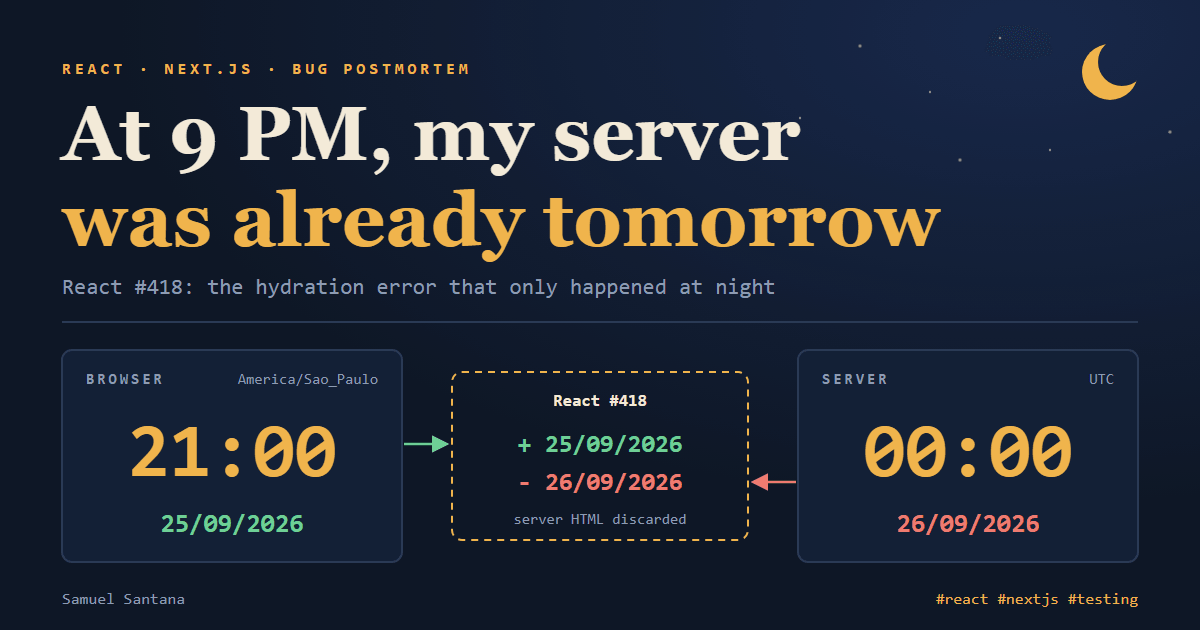
During the day, nothing. From 9 PM on, every load of the dashboard and of the public demo page of BolsoVerde, the sales-tracking app I build for small sellers in Brazil (bolsoverde.com), logged React error #418 in production: a hydration failure. At midnight, it went away. On screen, no symptom at all: no broken button, no wrong value.
An error that keeps a schedule is almost a confession. If it starts at 9 PM in Brasília, it starts at midnight in UTC.
The Date the Server Wrote
Every hydration error has the same shape: the HTML the server generated is not the HTML React generates in the browser when it takes over the page. Since React 18, a difference is not patched node by node. React discards the server's HTML up to the closest <Suspense> and renders that whole part again in the browser. The app declares no <Suspense> at all, so the part redone was, in practice, the entire page.
Here, the difference was a date. The dashboard has a "new expense" drawer that sits in the page from the first render, hidden, so it opens instantly when the user taps the button. Its date field started at "today":
function buildInitialState(): FormState {
  return { type: "EXPENSE", amountText: "", description: "", date: getCurrentDate() };
}
And getCurrentDate() had no bug at all. It returns the local day of whoever runs it, on purpose:
export function getCurrentDate(): string {
  const now = new Date();
  return `${now.getFullYear()}-${String(now.getMonth() + 1).padStart(2, "0")}-${String(now.getDate()).padStart(2, "0")}`;
}
The common shortcut, new Date().toISOString().slice(0, 10), returns the day in UTC, which in Brasília turns into tomorrow at 9 PM. I had already avoided that one.
What I had not considered was who runs the function first. On a Next.js page rendered on the server, the first one to mount that component is not the user's browser: it's the server. And the server runs in UTC, the default for servers in the cloud. Its local day is nobody's local day among the people using the app.
A little before 10 PM on September 25, in Brasília, the server was already living on September 26. The difference React reported was exactly that (this screen was in Portuguese, hence the day-first dates):
+ 25/09/2026
- 26/09/2026
The + is what the browser rendered; the -, what came in the server's HTML. The date shows up as text inside the button that opens the calendar, so this was a content mismatch, not an attribute one.
The same cause showed up somewhere else, one month at a time. The monthly results page starts on the current month; on the last evening of each month, the server wrote the next month in the header, and the browser wrote the right one.
Why No Test Caught It
Unit tests run in a single process, with a single clock. The development server runs on the same machine as the browser. In both cases, server and browser shared a clock and a time zone, so they produced the same date at any hour. The bug needed two things that never coincide in development: two different time zones, and a time between 9 PM and midnight.
And it didn't hurt in any visible way. React recovers on its own and moves on. The documentation itself sums up the cost: in the best case, a hydration error makes the page slower; in the worst case, event handlers can get attached to the wrong elements. This was the good case, but with two real costs. The first is exactly the work server rendering exists to save: on every load during those three hours, the browser rebuilt the page from scratch. The second is less obvious. An error that repeats every night becomes noise in monitoring. The team learns to ignore it, and the next hydration error, maybe one from the bad case, arrives hidden in the middle of it.
The Tempting Fixes
There are quick ways to make the error go away. They work in the strict sense, but they don't solve the problem.
suppressHydrationWarning on the element. It silences the warning, and that is where the risk lies. React's documentation is explicit: with it, React does not attempt to patch the mismatched text. The server's HTML stays, and the user would see tomorrow's date in the field. I would be trading an error in the console for wrong data on screen. On top of that, the suppression only works one level deep, and the text lives inside the app's shared date picker. I would have to suppress the warning in a component used by every form, hiding the mismatches I do want to see.
Turning off server rendering for the drawer (dynamic(..., { ssr: false })). It works, but it throws away server rendering for a whole component to fix one field.
Pinning the server's time zone to America/Sao_Paulo. That only moves the problem. The app also has English and Spanish versions; anyone outside Brasília's time zone would get the same bug, inverted. The server's clock is not the user's clock, and no fixed time zone turns one into the other.
Sending the user's time zone to the server, in a cookie or an account setting. It looks like the right version of the previous idea, but it runs into two limits. The first visit doesn't carry that information: the browser's time zone is only known after some JavaScript has run in it. And a saved setting goes stale: someone traveling keeps seeing their home day until somebody updates the account. What knows which day it is for the user is the device in their hand, at that moment.
The classic alternative that actually works is rendering twice: a useState(false) that flips to true in a useEffect, with the date only showing after that. It works. But React already has an API built for "one value on the server, another on the client", and the app already used that pattern elsewhere, such as the menu's screen width.
The Pattern That Stayed: A Null Server Snapshot
useSyncExternalStore takes three functions: one to subscribe to changes, one that reads the value on the client and one that reads the value on the server. That last one is used for the server render and also during hydration in the browser. If it returns null, both sides render the same HTML. Right after hydrating, React renders again with the client's value.
The whole hook is under thirty lines:
"use client";

import { useSyncExternalStore } from "react";
import { getCurrentDate, getCurrentMonth } from "@/lib/format";

// Nothing to listen to: the value is read again on every render, which is often enough for a date.
function subscribe() {
  return () => {};
}

const onServer = () => null;

/**
 * Today's local date ("2026-09-25"), or null while the server renders and the page hydrates.
 *
 * The server runs in UTC: from 21:00 in Brasília it is already tomorrow there. HTML rendered with
 * the server's "today" would not match what the browser renders, and React would throw the server
 * HTML away. Null on both sides keeps them equal; the browser's date follows right after.
 */
export function useToday(): string | null {
  return useSyncExternalStore(subscribe, getCurrentDate, onServer);
}

/** The local calendar month ("2026-09"), null on the server for the same reason as useToday. */
export function useCurrentMonth(): string | null {
  return useSyncExternalStore(subscribe, getCurrentMonth, onServer);
}
Two Details That Matter
The snapshot is a string. React compares successive reads with Object.is. Two calls to getCurrentDate() on the same day return equal strings, so the value is stable. If the hook returned a new Date(), every read would be a new object, and React would complain that the result of getSnapshot should be cached to avoid an infinite loop.
The subscription does nothing. There is no "the day changed" event to listen to; the value is read again on every render. That had a good side effect. Before, the default date went into the form's initial state and stayed frozen: someone who opened the app at 11:50 PM and logged an expense at 12:10 AM logged it with yesterday's date. Now the default follows the calendar until the user picks a date.
Null Forces You to Decide What to Show Before You Know the Day
The string | null type is what makes the fix safe. Every component that used the date now has to say what it shows while there is none, and the compiler points out every one of them.
In the form, the state now holds only what the user picked. The date stays undefined until they pick one, and the displayed value is resolved on every render (simplified code):
// Before: the date went into the initial state, computed by whoever rendered first.
const [state, setState] = useState<FormState>({ type: "EXPENSE", date: getCurrentDate() });

// After: the state holds only the user's choice; "today" comes from the hook.
const [state, setState] = useState<FormState>({ type: "EXPENSE" }); // date: undefined
const today = useToday();
const date = state.date ?? today ?? "";
The field is only empty in the server's HTML, inside a closed drawer nobody sees.
On the results page, the current month comes from the hook, and nothing is fetched before it exists:
const currentMonth = useCurrentMonth();
// Undefined until the user pages away from the current month.
const [ownMonth, setMonth] = useState<string | undefined>(undefined);
const month = controlledMonth ?? ownMonth ?? currentMonth;

useEffect(() => {
  if (!month) return; // still hydrating: there is no month to fetch yet
  // ...fetch that month's results
}, [fetchStatement, month]);
While the month is null, the header has no label, just as the dashboard already had none while its data loaded, and paging, reloading and exporting do nothing. That lasts only until the render right after hydration, and at no point does a wrong month appear.
Reproducing It on Purpose
Fixing without reproducing would be a bet. The bug needs the server and the browser in different time zones, so I forced the two to disagree:
- the development server started with
TZ=UTC npm run dev; - the Playwright browser ran in
America/Sao_Paulo; - for the month boundary, instead of waiting for the 30th at 9 PM, I moved only the browser's clock with
page.clock.setFixedTime.
// crawl-hydration.mjs. Run it with the server in UTC: TZ=UTC npm run dev
import { chromium } from "@playwright/test";

const BASE_URL = "http://localhost:3031";
const PAGES = ["/", "/demo", "/resultado"]; // 24 routes in my case

const browser = await chromium.launch();
const context = await browser.newContext({ timezoneId: "America/Sao_Paulo" });
// Signed-in routes: inject the session cookie with context.addCookies(...)
const page = await context.newPage();

// Optional: move only the browser's clock. The server keeps the real one.
await page.clock.setFixedTime(new Date("2026-08-20T12:00:00-03:00"));

const failures = [];
page.on("pageerror", (error) => failures.push(`${page.url()}\n${error.message}`));

for (const path of PAGES) {
  await page.goto(`${BASE_URL}${path}`);
  await page.waitForLoadState("networkidle");
}

console.log(failures.length ? failures.join("\n\n") : "no mismatch");
await browser.close();
One detail: in my crawler, the mismatch arrived as a pageerror, not as a console.error. A script listening only to the console would have reported that everything was fine.
The crawler went through 24 pages, 8 public and 16 signed in with a test account. With the real clock, a little before 10 PM, exactly two failed: the dashboard and the demo, with +25/09/2026 -26/09/2026. With the browser's clock moved to August, the results page failed too, with +Agosto 2026 -Setembro 2026. Nothing else did. After the fix, the same crawler found no mismatch on any of the 24, with either clock.
The hook got tests too, but they prove something else. This one guarantees the server's HTML never carries the date, even at the worst moment of the month:
function Probe() {
  const today = useToday() ?? "no date";
  const month = useCurrentMonth() ?? "no month";
  return <p>{`${today} / ${month}`}</p>;
}

beforeEach(() => {
  vi.useFakeTimers({ toFake: ["Date"] });
  // 22:30 in Brasília on the last day of the month: already October in UTC.
  vi.setSystemTime(new Date("2026-09-30T22:30:00-03:00"));
});

it("renders nothing date-dependent in the server's HTML", () => {
  expect(renderToString(<Probe />)).toContain("no date / no month");
});
The unit test proves the hook's contract. What proved the bug was gone was the crawler, because only it runs with two different clocks.
From a Crawler to CI
A crawler run once proves the bug was gone that day. It doesn't stop the next component from putting a getCurrentDate() in its first render. For that, the disagreement between the clocks had to become part of the suite that runs on every pull request.
The time zone alone doesn't work in CI: the disagreement only exists after 9 PM, and the pipeline runs at any hour. The way out is the same as the month-boundary test, only permanent. The server keeps the real clock, and the browser goes 45 days back. More than 31 days guarantees the two disagree on the day and the month, at any hour, on any date. In a production build the error arrives minified, pointing at react.dev/errors/418, hence the regular expression:
const BROWSER_CLOCK_SHIFT_MS = 45 * 24 * 60 * 60 * 1000;

// Production builds report a hydration mismatch as a minified error pointing at react.dev/errors.
const HYDRATION_ERROR = /hydrat|react\.dev\/errors\/(418|423|425)\b/i;

async function hydrationErrorsOn(page: Page, path: string): Promise<string[]> {
  const errors: string[] = [];
  page.on("pageerror", (error) => {
    if (HYDRATION_ERROR.test(error.message)) errors.push(error.message);
  });

  // The server keeps the real clock; the browser goes 45 days back.
  await page.clock.setFixedTime(new Date(Date.now() - BROWSER_CLOCK_SHIFT_MS));
  await page.goto(path);
  await page.waitForLoadState("networkidle");
  return errors;
}

for (const path of SIGNED_IN_PAGES) {
  test(`${path} hydrates without a mismatch`, async ({ page }) => {
    expect(await hydrationErrorsOn(page, path)).toEqual([]);
  });
}
The spec visits 28 pages, 12 public and 16 signed in. A regression test is only worth something if it fails when the bug comes back, so I brought the bug back on purpose: I made the hook's server snapshot read the server's clock again. Exactly five pages failed: the dashboard, the demo in all three languages and the results page, the same ones the original fix had covered. With the hook restored, all 28 passed.
There was an irony along the way. Since July, the E2E suite had already pinned the browser's clock to June 2025 in the dashboard tests, to match the sample data of the mock services. The bug's condition was set up on every run of the suite. Nobody was listening for the error.
Why It Matters
"Today" looks like a value, but it is an incomplete question: today where? In the browser, the answer is obvious. On the server, there is no user; there is a machine in a time zone nobody picked with the reader in mind. Anything derived from the clock that makes it into the first HTML is the server's guess about someone else's day.
The rule the project kept is short: whatever depends on the current time and shows up before the data arrives comes from the browser, and the server renders "I don't know yet". The broader lesson goes beyond dates. A bug that only exists when two environments disagree never shows up in any environment where they agree. To see it, you have to force the disagreement instead of waiting for 9 PM. And once it's fixed, that disagreement has to stay in CI, so the next bug of the same family breaks a pull request, not production.
Comments
Loading comments...