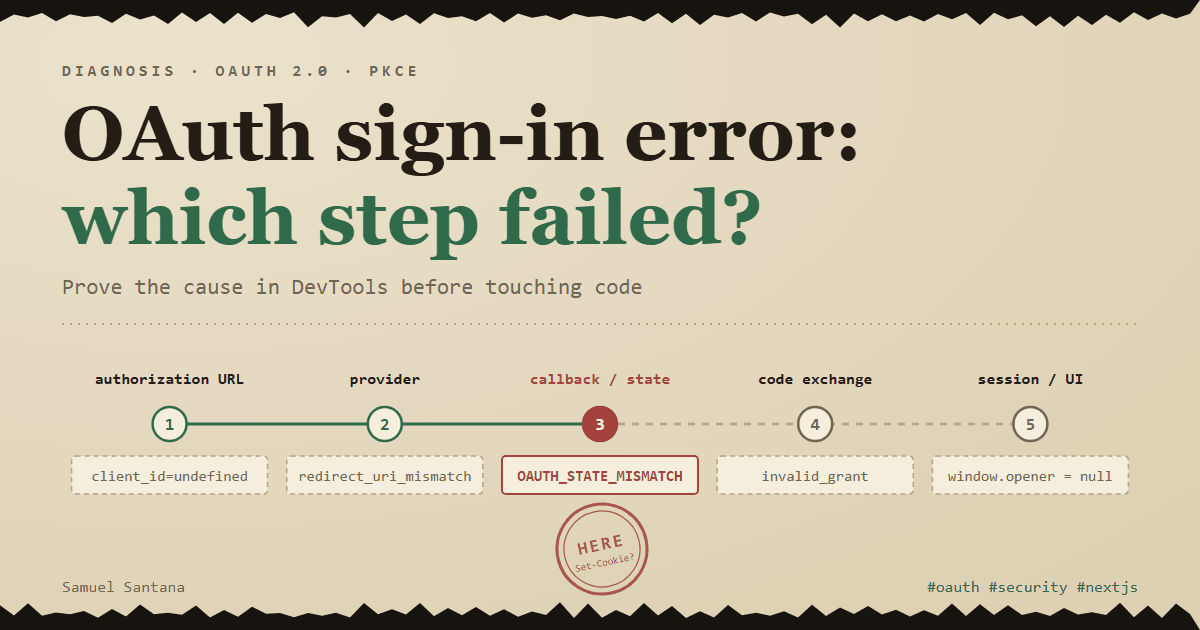
OAuth sign-in error? How to find the step where the login broke
 Samuel Santana
"Failed to initialize OAuth", "Couldn't sign you in", "Login failed". The message that reaches the user almost never says where the flow stopped, and an OAuth login has at least five places to stop. Each one leaves a different trail, and the trail shows up before you read a single line of code.
This post is a map organized by symptom: where to look, how to prove the cause, what to fix. The examples come from the Google and GitHub login on samuelsantana.dev, whose code is open in vertex-api and vertex-web. One of them is my own correction: until October 2 my login sent neither state nor PKCE.
First, find the step
In the authorization code flow, the login goes through five steps, and each one fails in its own way:
| Step | Where to look | What the failure looks like |
|---|---|---|
| 1. The app builds the authorization URL | first request of the popup or tab | provider error page, or a console error |
| 2. The provider authenticates and redirects back | provider page, or ?error= on the callback | redirect_uri_mismatch, invalid_client, access_denied |
3. The callback checks state | the callback request and its cookies | state mismatched or missing |
4. The backend exchanges the code for tokens | server log (the browser can't see it) | invalid_grant, invalid_client |
| 5. The session is created and the UI notified | session cookie, window.opener | signed in, UI unaware |
The tool is the DevTools Network panel, opened in the popup (it is another window, with its own DevTools), with "Preserve log" checked so it survives the redirects.
One detail that costs time: the HAR Chrome exports by default is sanitized and excludes Cookie, Set-Cookie and Authorization, exactly the headers that explain a state error. For that case, read the Cookies tab live.
Step 1: the authorization URL is already wrong
Start by reading the URL the browser was given to reach the provider. On samuelsantana.dev, the popup opens an API route, and the API answers with the redirect:
$ curl -sI https://api.samuelsantana.dev/auth/google
HTTP/1.1 302 Found
cross-origin-opener-policy: same-origin-allow-popups
Set-Cookie: oauth_state_google=<state>.<verifier>.<signature>; Max-Age=600; Path=/auth/google/callback; HttpOnly; Secure; SameSite=Lax
location: https://accounts.google.com/o/oauth2/v2/auth?code_challenge=YiKK...&code_challenge_method=S256&response_type=code&redirect_uri=https%3A%2F%2Fapi.samuelsantana.dev%2Fauth%2Fgoogle%2Fcallback&scope=email%20profile&state=kxzm...&client_id=<client-id>
That one response answers half the questions: client_id present, redirect_uri absolute and on https, state, and code_challenge with S256. The two headers at the top come back in steps 3 and 5.
client_id=undefined and the variable that wasn't in the build
If the URL is built in the browser of a Next.js app, the value comes from a NEXT_PUBLIC_* variable, which is inlined into the JavaScript at next build time. The docs are explicit: after the build, the app "will no longer respond to changes to these environment variables". Changing the value in the hosting dashboard without a new build changes nothing. And only the literal reference is replaced: process.env[name] and const env = process.env; env.NEXT_PUBLIC_X are left out.
The symptom depends on what the code does with the missing value. A URL with client_id=undefined ends on Google's error page. My code has the silent variant:
// LoginModal.tsx (vertex-web)
const API_URL = process.env.NEXT_PUBLIC_VERTEX_API_URL ?? "http://localhost:3333";
The fallback is there for development. The price is that a build without the variable doesn't fail: it ships a popup that opens localhost:3333 on the visitor's machine, and the symptom becomes "this site can't be reached", with no mention of OAuth at all. In this design's favor: the client_id never goes into the browser bundle, because the API is what builds the provider URL.
The library that fails to initialize
If the code uses Google's old library (platform.js, gapi.auth2), its initialization error is idpiframe_initialization_failed: "failed to initialize a required iframe from Google". It has been deprecated since March 31, 2023, and client IDs created after July 29, 2022 cannot use it. The way out is Google Identity Services, where a missing client_id or scope produces a console error and errors outside the protocol arrive through error_callback (popup_failed_to_open, popup_closed). In Auth.js, the equivalent is OAuthSignInError: OAuth login "could not be started".
Step 2: the provider refuses
RFC 6749 splits the errors of this step into two groups, and the split is already a diagnosis. If the problem is the redirect_uri or the client_id, the provider must not redirect back: the user is left on a provider error page and your server never hears about it. Every other error comes back to the callback as ?error=...&state=.... An empty callback log points to the first group.
redirect_uri_mismatch
RFC 9700, the OAuth security best current practice published in January 2025, requires exact string matching between the received redirect_uri and the registered one. So the question isn't "does it look the same?", it is "which byte is different?": http versus https, a trailing slash, www, the port, a locale prefix in the path.
Google hides the answer in the URL of its own error page, in an authError parameter. It is base64url of a binary structure, with no documented format, but readable:
# authError value copied from the address bar of Google's error page
node -e "console.log(Buffer.from(process.argv[1], 'base64url').toString('utf8'))" 'ChVyZWRpcmVjdF91cmlf...'
In a test with my site's client_id and a deliberately wrong redirect_uri, the output contained the code redirect_uri_mismatch, the user-facing message, the link to the error's documentation and the most useful part: the redirect_uri Google received, https://example.com/callback. That is the value to compare, byte by byte, with the one in the Console. If the code builds the redirect_uri from the request and a proxy terminates TLS in front of it, this is where the http shows up.
invalid_client, deleted_client and access_denied
With a client_id that doesn't exist, the decoded authError says invalid_client and "The OAuth client was not found". Google's official list has a less obvious relative, deleted_client: clients deleted manually or "automatically in the case of unused clients". A forgotten demo project can lose its login without anyone touching it.
access_denied is the user or the authorization server denying the request. It comes back to the callback, and the callback has to handle error before looking for code. It is the first thing the vertex-api guard checks, and an error leaves the state cookie alone, because an error response proves nothing about who sent it.
At Google, refusal also comes from testing mode: an app with "Testing" status is limited to up to 100 listed test users. In that status, the refresh token expires in 7 days, unless the only scopes are name, email and profile. A login-only app escapes the rule; an app that asks for Google Drive loses offline access after a week, with no error at all in the login itself.
Step 3: the callback rejects state
Without state, an attacker drives the victim's browser to your callback with their own authorization code, and the victim ends up signed in to the attacker's account. That is the attack RFC 6749 describes. RFC 9700 requires the client to prevent it: if the provider is known to support PKCE, the client may rely on it; in OpenID Connect, the nonce plays that role; otherwise, a one-time token in state, bound to the browser that started the flow, is mandatory.
I had neither. Until vertex-api #57, on October 2, the callback accepted any code. Now the API generates state and a verifier, keeps both in a signed cookie and checks them on the way back:
// oauth-state.util.ts (vertex-api), simplified
if (query.error) {
  return {}; // the provider refused; there is no code to check
}

if (query.code) {
  const attempt = takeOAuthAttempt(request, reply, provider); // reads and clears the cookie
  if (!attempt || !statesMatch(attempt.state, query.state)) {
    throw new OAuthStateMismatchException(); // before passport: the code is never exchanged
  }
  return { codeVerifier: attempt.codeVerifier };
}

const attempt = createOAuthAttempt(); // 32 random bytes for state and verifier
rememberOAuthAttempt(reply, provider, attempt);
return { state: attempt.state, codeChallenge: codeChallengeFor(attempt.codeVerifier) };
The comparison uses timingSafeEqual, and the cookie is cleared when read, so one attempt is good for one callback. The full code justifies every cookie attribute. The ways state fails to match:
It expired. The cookie lives 10 minutes (Max-Age=600).
Another tab, or two clicks. There is one cookie per provider. The second attempt overwrites the first, and the first one's callback compares its state with the second's. Hence the site's message for this error: "The sign-in expired or was started in another tab. Please try again."
The cookie wasn't sent. The big group. The culprit is an attribute of the Set-Cookie from step 1:
SameSite=Strict: the provider's redirect back is a navigation from another site, andStrictcookies are only sent with requests originating from the same site.Laxis sent on top-level navigations with a safe method, like the redirect's GET. That is why vertex-api usesLax.response_mode=form_post: the way back is a POST, andLaxis not sent on cross-site POSTs. When the browser appliesLaxas the default (the cookie declared noSameSite), MDN records an exception: the POST still carries the cookie if it was set no more than two minutes earlier. Fast consent gets in; slow consent doesn't. Google offersform_postin its discovery document; with it, the cookie needsSameSite=None; Secure.Path: the vertex-api cookie hasPath=/auth/google/callbackand, by the attribute's rules, is not sent to/en/auth/google/callback. A locale middleware that redirects the callback drops thestate. In July, vertex-web went as far as taking/authout of the next-intl middleware so an English-speaking visitor wouldn't be sent from/auth/googleto/en/auth/google(fc59b9e).- Host: without
Domain, the cookie is host-only. Starting onexample.comand coming back onwww.example.combreaks. - Iframe: inside another site's iframe, the cookie is third-party. Firefox and Safari isolate or restrict it by default. Chrome doesn't block by default, only in Incognito or by user choice, and in October 2025 Google confirmed it is keeping that approach. A login inside an iframe works or not depending on the clicker's browser.
The signature changed. The cookie is signed with COOKIE_SECRET. Rotating the secret between the way out and the way back gives the same error.
The proof is always the Cookies tab of the callback request. If oauth_state_* isn't there, go back to the step 1 redirect, find the Set-Cookie and hover the info icon: Chrome shows why it was blocked. In Auth.js, this whole family shows up as InvalidCheck, "a PKCE, state or nonce OAuth check could not be performed", and the docs themselves point to a misconfigured provider or a browser blocking cookies.
Step 4: the code exchange fails
This step is server to server. The browser sees nothing; the token endpoint's answer is in your log, or nowhere.
invalid_grant and invalid_client
Per RFC 6749, this covers a code that is invalid, expired, revoked, issued to another client, or that doesn't match the authorization's redirect_uri. In practice, four questions:
Was the code used twice? It is single-use, with a recommended maximum lifetime of 10 minutes, and a second use must be denied. GitHub answers bad_verification_code for an incorrect or expired code, and its codes are valid for 10 minutes. One way to spend it twice without noticing is exchanging the code inside a useEffect: in development, Strict Mode runs one extra setup and cleanup cycle for every Effect, and in the App Router it is on by default. The second call carries the same code. In production the extra cycle doesn't exist, and the bug is dev-only.
Is the exchange's redirect_uri the same as the authorization's? The RFC requires identical values.
Is the PKCE verifier the right one? If the hash of the code_verifier doesn't match the code_challenge sent on the way out, the answer is invalid_grant. It happens when the verifier is generated again on the way back, or was left in another process's memory. vertex-api keeps it in the same signed cookie as state, so the callback always has that attempt's verifier, with no server-side state. Google advertises S256 in its discovery document, and GitHub has accepted PKCE since July 14, 2025, S256 only.
Does the exchange state live in a single process's memory? This one is from my code. The API doesn't hand the token to the browser: it hands over its own single-use, 60-second code, which the frontend exchanges server to server (the reason is in the post about tokens in URLs). In the July post, it lived in an in-memory Map; with more than one process behind the URL, whoever creates the code and whoever spends it can land in different memory. I fixed it before seeing the symptom, in vertex-api #36: the code lives in Postgres, as a SHA-256, and is consumed with one DELETE ... RETURNING, which also gives two simultaneous exchanges exactly one winner.
invalid_client at the exchange, on the other hand, is the secret, not the ID: "the OAuth client secret is incorrect", in Google's words, or incorrect_client_credentials at GitHub.
The ID token and the clock
Whoever validates the OpenID Connect ID token themselves checks iss, aud, exp and nonce, and the specification allows "some small leeway, usually no more than a few minutes, to account for clock skew". A server running behind sees a token from the future. I measured it with jose 6.2.3, with iat and nbf 90 seconds ahead:
await jwtVerify(token, publicKey, { issuer, audience, clockTolerance: 0 });
// ERR_JWT_CLAIM_VALIDATION_FAILED: "nbf" claim timestamp check failed

await jwtVerify(token, publicKey, { issuer, audience, clockTolerance: 120 });
// ok
Without nbf, with only iat ahead, the same call passed with clockTolerance: 0. The leeway should be small and explicit; the real fix is syncing the server's clock.
Step 5: the login happened and the UI doesn't know
If the API sets the session cookie on its own domain and the frontend lives on another, the frontend never sees it. That was the bug in the July post; the choice between session cookies and JWTs is in the post on JWT vs sessions. The case that deserves space here is another one.
The popup that loses its opener
Symptoms: window.opener is null in the callback, postMessage to the opener never arrives and, in the opener, popup.closed turns true while the popup is still on screen. Code that waits for the popup to close to conclude "the user gave up" concludes it within the first second.
The cause is Cross-Origin-Opener-Policy, and the first suspect is usually the provider. On October 2, with Playwright on Chromium, I tested that suspicion: a popup opened straight at Google or GitHub kept its opener: Google sends only Cross-Origin-Opener-Policy-Report-Only, which reports and doesn't enforce, and GitHub sends no COOP. The same popup opened through my API's /auth/* route lost its opener. The cut came from the first header in step 1, same-origin-allow-popups, which vertex-api's Helmet sets on every response (Helmet's default is same-origin).
MDN explains why. The blog page sends no COOP, which is equivalent to unsafe-none, and documents with unsafe-none will always open documents with any other value into a new browsing context group. same-origin-allow-popups preserves a page's references to the popups it opens; it does nothing for the opener of a document that is the popup. The popup switches groups on the first redirect, before reaching the provider, and nothing afterwards restores the reference.
The way out was to stop depending on opener. The callback and the opener are on the same origin, and a BroadcastChannel is scoped by origin, not by a reference between windows:
// In the callback, inside the popup
new BroadcastChannel("vertex-oauth").postMessage("oauth-success");
window.close();

// In the opener, mounted once
const channel = new BroadcastChannel("vertex-oauth");
channel.onmessage = (event) => {
  if (event.data === "oauth-success") refreshSession();
};
By MDN's table, unsafe-none on the /auth/* routes should keep the opener. I haven't tested it, and I don't need to: the channel works with or without it. The full reasoning is in a comment in vertex-web, corrected in #96.
Mix-up, the error that doesn't show
A client that talks to more than one provider can be tricked into treating one's response as if it came from the other. RFC 9700 makes a defense mandatory: preferably the iss parameter from RFC 9207, which identifies the issuer in the response itself; failing that, a distinct redirect_uri per provider. Google advertises authorization_response_iss_parameter_supported: true in its discovery document, but vertex-api doesn't read iss: it uses one callback per provider and a state cookie pinned to each one's Path.
Why this matters
For whoever clicks, all these failures are one: "failed to initialize OAuth". For whoever maintains it, they are more than a dozen problems, each with its own proof. Merging them all into one generic message leaves the user not knowing what to try, and whoever investigates starts from scratch.
The rule I follow now: every failure leaves the API with a machine-readable code, and translation happens at the edge. When state doesn't match, the API redirects the popup to /auth/callback?oauth_error=OAUTH_STATE_MISMATCH, the callback relays the code over the BroadcastChannel, and the opener translates it into the visitor's language (vertex-web #99): "The sign-in expired or was started in another tab. Please try again." The message tells the user what to do; the code tells me which step to look at.
Before touching code over an OAuth error, the first question is which of the five steps it stopped at. The answer is almost always in a URL or a Set-Cookie, and almost never where the message appeared.
References
- RFC 6749 — The OAuth 2.0 Authorization Framework
- RFC 9700 — Best Current Practice for OAuth 2.0 Security
- RFC 7636 — Proof Key for Code Exchange (PKCE)
- RFC 9207 — OAuth 2.0 Authorization Server Issuer Identification
- OpenID Connect Core 1.0 — ID Token Validation
- Google — Using OAuth 2.0 for Web Server Applications
- Google — Using OAuth 2.0 to Access Google APIs
- Google Cloud — Manage App Audience
- Google Identity Services — Handle errors
- Google Sign-In for Web — Reference
- Google Sign-In for Web — Deprecation and sunset
- Google — OpenID Connect discovery document
- GitHub — Authorizing OAuth apps
- GitHub — Troubleshooting authorization request errors
- GitHub — Troubleshooting OAuth app access token request errors
- GitHub Changelog — PKCE support for OAuth and GitHub App authentication
- MDN — Set-Cookie
- MDN — Cross-Origin-Opener-Policy
- MDN — Third-party cookies
- Privacy Sandbox — Update on plans for Privacy Sandbox technologies
- Chrome DevTools — Network features reference
- Next.js — Environment Variables
- Next.js — reactStrictMode
- React — StrictMode
- Auth.js — Errors
- Helmet
Comments
Loading comments...