Pyxis: product analytics without cookies, IP addresses or personal data (and why I built my own)
 Samuel Santana
While you read this, this page is being measured. When it opened, it sent a page_view with the page's path (and, if it was the first page of your visit, the domain you came from) and an article_viewed with the post and the language. When you pass a quarter, half, three quarters and the end, it sends article_read_25, _50, _75 and _100, each with how many seconds the tab has been visible so far. If you click an item in the table of contents or copy a code block, it sends one more. That's it. The measurement wrote no cookie to your browser (unless you signed in to comment, the only one you will find is NEXT_LOCALE, which keeps the site's language), your IP address was not stored anywhere, and when you close this tab nothing will link this visit to the next one.
You can check. Open your browser's developer tools on the Network tab and filter by batch: events leave in batches, every five seconds or when the tab is hidden, in a POST to api.pyxis-analytics.dev/v1/batch with a plain-text body you can read in full. The blog's footer has a switch that turns measurement off in this browser. And if your browser sends the Global Privacy Control or Do Not Track signal, none of this leaves it.
The tool doing this is Pyxis, which I wrote: three public repositories, in production since October 6, 2026, measuring BolsoVerde and, since October 10, this blog, which replaced Google Analytics with it. This post covers why I built it instead of installing something, what it stores, what it never stores, and how each privacy promise became a function with a test. The versions quoted are today's, October 13, 2026: the pyxis-analytics tracker 0.2.1, the API 0.13.0 and the dashboard 0.15.0.
The problem: visitors from ads and no idea what they did
BolsoVerde is an app for small sellers to keep track of sales, fees and payouts. When it started getting visitors from ads, I had no way to know what those people did: whether they used the calculator on the home page, opened the sign-up, stopped at the Terms, or were on a phone. Inside the app, the same blind spot was waiting for the first users: which screens get used, where a write fails, at what point someone gives up.
There were seven questions, all of them about the product:
- Who visited each page, and where did they come from (an ad, search, a direct link)?
- How many got as far as seeing a calculator result?
- How many opened the sign-up, how many submitted it, how many finished?
- Which features of the app are actually used?
- Which requests fail, how often, and on which screen?
- What did one person do, in order?
- Phone or computer, which browser, which system?
Why build instead of install
The default answer is to install Google Analytics, or a product analytics tool like PostHog. Both answer almost all of that. The cost comes along: by default, they keep an identifier in the browser that recognizes the person for months, and the data goes to another company. For an app that handles small sellers' money, that meant one more company in the Privacy Policy and a measurement that, under the most common reading of the law, would depend on consent: it would only count those who accepted the banner, and I would be looking at a sample that picked itself.
There are also cookieless analytics tools, some of them open source, that you can host yourself. I could have used one of them. I built Pyxis for three reasons:
- Product questions, not just traffic. I wanted a failed write together with the screen it came from, the funnel from the ad to the first sale, and one person's timeline starting at the anonymous visit before they signed up. And I wanted all of that erased on its own when the account is deleted.
- No new company receiving data. Pyxis runs on the same AWS, the same Neon and the same Vercel that BolsoVerde already used and that its Privacy Policy already named.
- I wanted to decide every rule. What leaves the browser, how long it is kept, what is never read. In an off-the-shelf tool, those rules belong to someone else. Here they are functions I wrote, tested and published, and anyone can audit them.
And there is a fourth, the most honest one: I wanted to know how to build this, and I wanted the result to be public.
What Pyxis stores, and what never leaves the browser
The starting point was a list of what must not exist in the database. The rest of the design came from it.
| What | What happens |
|---|---|
| Cookie | None. A visit is a random id in sessionStorage: it dies when the tab closes and is replaced after 30 minutes without activity. Two tabs are two visits |
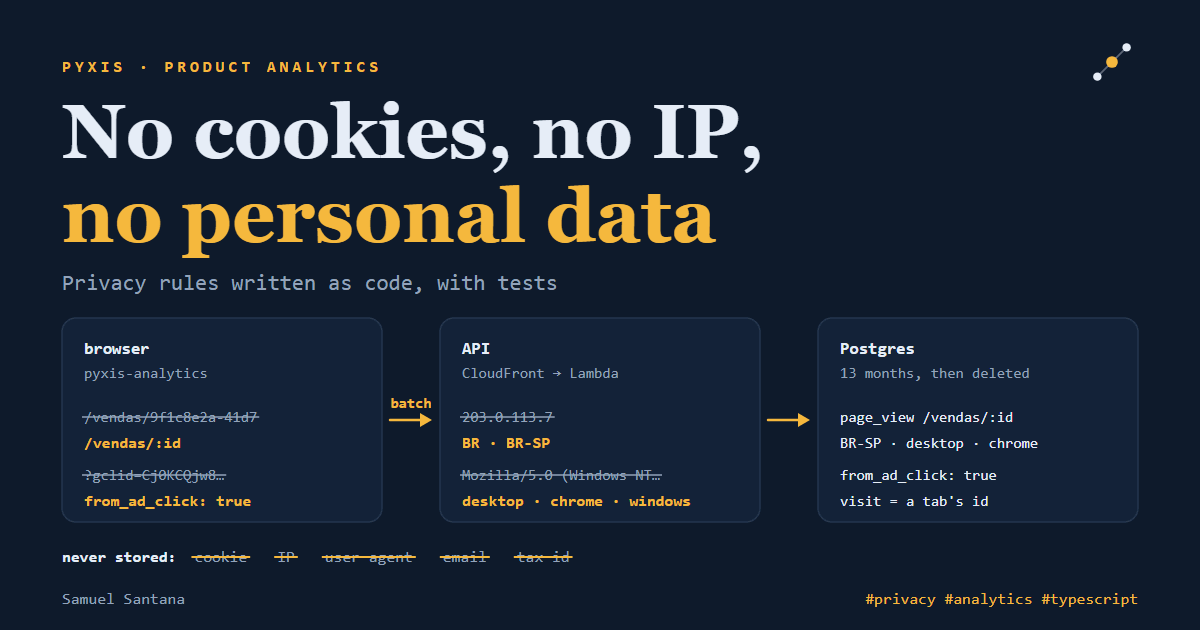
| Page address | Reduced to a template in the browser: /vendas/9f1c… becomes /vendas/:id, and emails and long runs of digits never leave. The API templates it again on its side |
| Query string | Dropped, except utm_source, utm_medium and utm_campaign. An ad click id becomes just from_ad_click: true |
| IP address | Read on the spot to limit abuse, then discarded. Nothing is stored, not even a hash. Country and state come from headers CloudFront derives from the IP; the city is never read |
| User agent | Classified into device type, browser family and operating system, then discarded. Bots that announce themselves are refused |
| Event properties | A server-side barrier drops any value that looks like an email address, a phone number or a Brazilian tax id (CPF, CNPJ) |
| "Do not track" | Global Privacy Control and Do Not Track turn the tracker off before anything enters the queue |
| Opt-out | optOut() writes a single marker to localStorage, the only thing the tracker keeps beyond the tab |
| Retention | 13 months. A daily job deletes what is older |
| Identified person | Only by the site's internal id, never by email. One call erases their events, including those of the anonymous visit in which they signed in, and another exports them |
This set has a price, and I would rather say what it is: Pyxis does not know that the person who used the calculator yesterday is the same one who created an account today. Without an identifier that lasts, two anonymous visits are never linked. A person only gets a history once they sign in, and from then on by the site's internal id. That was a choice: the alternative was an id that lasts for months in the browser, which is exactly what I did not want to keep.
The rules are code, not policy text
A privacy policy makes promises. The code is what keeps them, and you can show that it does when each rule lives in a small, pure, tested function. This is the one in the tracker that decides whether a segment of the path is an identifier:
const UUID_PATTERN = /^[0-9a-f]{8}-[0-9a-f]{4}-[0-9a-f]{4}-[0-9a-f]{4}-[0-9a-f]{12}$/i;
const ALL_DIGITS = /^\d+$/;
const DIGIT = /\d/g;
const ENCODED_AT_SIGN = /%40/i;
const MIN_ID_DIGITS = 10;

function isIdentifier(segment: string): boolean {
  return (
    UUID_PATTERN.test(segment) ||
    ALL_DIGITS.test(segment) ||
    (segment.match(DIGIT)?.length ?? 0) >= MIN_ID_DIGITS ||
    segment.includes('@') ||
    ENCODED_AT_SIGN.test(segment)
  );
}
templatePath applies it to each segment and replaces anything that is an identifier with :id, after trying the rules the site declared (pathRules: ['/blog/:slug']). The tests state the rule out loud: turns /vendas/9f1c… into /vendas/:id, turns /u/joao@x.com into /u/:id, handles a path made of thousands of slashes in linear time. The last one exists because the path is the visitor's input: a privacy rule that hangs on a malicious URL is a problem too.
"Do not track" is the first thing the tracker checks:
export function trackingStatusOf(signals: PrivacySignals): TrackingStatus {
  if (signals.globalPrivacyControl || signals.doNotTrack) {
    return 'blocked-by-browser';
  }
  return signals.optedOut ? 'opted-out' : 'on';
}
The browser's signal wins over the choice made on the page, on purpose: a switch in a site's footer must not turn back on a "do not track" the person set for the whole browser.
The tracker is only the first layer. A project's public key sits in the site's HTML, like every public key, and anyone can send a batch straight to the API without going through the tracker. That is why the API templates every path again with the same rules, drops properties that look like personal data and refuses the whole event when the user id looks like an email address or a document number. The browser is polite; the server is suspicious.
The three repositories are at 100% coverage of statements, branches, functions and lines, and CI fails below that. Coverage does not prove a test is right, but it guarantees that no rule was left with nobody looking at it.
How it works inside
browser                      AWS, São Paulo                       dashboard
pyxis-analytics ── batch ──▶ CloudFront ◀───── queries ────────── Next.js on Vercel
path templates                   │                                email-code sign-in
no cookie                        ▼                                opaque session
                             Lambda (NestJS)
                             validates each event,
                             drops IP and user agent
                                 │
                                 ▼
                             Postgres (Neon)
The tracker (pyxis-analytics on npm) is about 4.8 KB gzipped in version 0.2.1, within a 5 KB budget that CI measures on every push, and has no dependencies. The rules live in a pure core, with no window or document; the browser comes in through small adapters (transport, storage, History API, clock) that the tests swap for fakes. A batch goes out as text/plain with credentials: "omit": that way the browser makes no CORS preflight request, sendBeacon works when the tab is hidden, and no cookie of any domain travels with it. Every version is published by GitHub Actions with provenance on npm, so you can check which commit the package you installed came from.
The API is NestJS on Fastify, on AWS Lambda behind CloudFront, in the São Paulo region, with Postgres on Neon and the infrastructure in Terraform. Three of its decisions:
- Each event is validated on its own. An invalid event does not sink the batch: the answer is
202with how many were accepted, how many were duplicates and how many were rejected. A resent event is recognized and never stored twice. - Rate limiting without storing the IP. 120 batches a minute per address and 3,000 per project, counted in memory in each execution environment; no counter goes to the database. The address comes from a CloudFront header, which can only be trusted because CloudFront also sends a secret the function requires before doing anything else.
X-Forwarded-Foris ignored. - The dashboard reads the raw events, with no pre-aggregated tables. On a local Postgres with one million events of one project, the 30-day overview answers in about half a second. For the size of the projects Pyxis measures, an aggregation job would be complexity with no return.
In a load test through CloudFront, 10,000 events over ten minutes were accepted without a single error, with a p50 of 104 ms and a p95 of 140 ms measured on the client, and a p95 of 29 ms inside Lambda.
The dashboard is Next.js 16 on Vercel. You sign in with a six-digit code sent by email, exchanged for an opaque session the server can revoke at any time, including on every device at once. The browser only sees an HttpOnly cookie of the dashboard's own host, set by a Server Action; the Next.js server is what talks to the API. It is the design I argued for in a July post about JWT and sessions, now in a system in production. The screens are the overview, visits, funnel, features, requests, devices, acquisition and one person's timeline, in English and Portuguese, and every Monday a summary of the week arrives by email. The charts are SVG drawn on the server: no charting library ships to the browser.
What you can open now
- Dashboard demo: the same screens as production, no sign-in, with the invented data of an example store.
- Tracker playground: the real tracker in dry-run mode, showing every batch it would send, with no request leaving the page.
- Dashboard Storybook, with the components in their states, and every story also tested for accessibility.
- API reference, built from the OpenAPI contract on every push.
- The code, MIT licensed, with the architecture decisions recorded in ADRs: pyxis-sdk, pyxis-api and pyxis-web. This blog's integration is public too, in vertex-web.
What BolsoVerde measures
Integrating a site is small: a public key, an init() in the layout and a track() at each moment that matters.
import { init, track, identify } from 'pyxis-analytics';

init({
  key: 'pyxis_pk_…',
  endpoint: 'https://api.pyxis-analytics.dev',
  pathRules: ['/vendas/:id'],
});

track('calculator_result_shown', { calculator: 'ifood' });
identify('internal-account-id');
BolsoVerde sends the pages viewed, by their path template; named actions such as "saw a calculator result", "clicked Create account", "created the account" and "recorded a sale"; the result of writes (success or error, the error code and how long it took) and only the reads that failed; and, after sign-in, the account's internal id. Never the email, never a typed value.
When someone deletes their account, BolsoVerde's backend asks Pyxis to erase that person's events, including those of the anonymous visit in which they signed in, and repeats the request until it succeeds. The copy the person downloads with "Download My Data" includes those events. The Privacy Policy names Pyxis and describes exactly that, and the order was on purpose: the policy went live before the key was configured in production. A policy never describes what does not run, and the code never does what the policy does not say.
No banner? My reading
Pyxis measurement does not ask for consent. On BolsoVerde, the cookie banner that exists is the one for Google's ads, and Pyxis does not go through it; this blog has no banner at all. The legal basis BolsoVerde's Policy declares is legitimate interest under the LGPD, Brazil's data protection law, and the argument is the whole design in this post: no cookie, no identifier that recognizes someone on another day, IP and user agent never stored, no third-party analytics company receiving the data, and, on the other side, transparency in the policy, "do not track" honored and a way to turn measurement off.
That is my reading, not legal advice. Anyone adopting something similar should check with someone who knows data protection law, and remember that the conclusion holds for the whole set, not for one piece in isolation.
The limits
- Two anonymous visits are never linked, not even two tabs of the same person. That is the price of the most important row in the table.
- The counts are a floor. A blocker can refuse the request, and whoever turns on "do not track" is left out of the count, as it should be.
- Bots that look like browsers get through. Pyxis refuses the ones that announce themselves as bots, but one that presents itself as an ordinary Chrome counts as a visit.
- It is built for small projects. The queries read the raw events; a project with millions of events a month will need the aggregated tables I have not written yet, and the file that defines each metric already says what each of them would have to count.
Some of Pyxis's decisions will become posts of their own: the bug that only existed on Lambda, where Postgres returned a list as text and the dashboard showed one letter per line; how the tracker fits in 5 KB; and why comparing "today" with "yesterday" at ten in the morning showed a 58% drop every day.
If you made it this far, this page just sent an article_read_100, unless your browser asked not to be tracked.
Comments
Loading comments...