Connection Pooling on Serverless Postgres: Why Your API Chokes in Production
 Samuel Santana
It works perfectly on your localhost. It passes CI. It works in staging with two test users. Then you ship to production, traffic grows a little, and the API starts returning too many connections or, worse, prepared statement "s1" already exists, an error that makes no sense to someone who has never written a PREPARE in their life.
That is rarely a bug in your code. It is the physics of database connections colliding with the physics of serverless environments, and most Node and Postgres tutorials never mention it.
I did this math when the API behind this blog, vertex-api, moved to AWS Lambda and started talking to Neon's Postgres through the pooled endpoint. What follows is the reasoning that ended up written down in the code.
Connections Are Expensive, and Serverless Multiplies Who Asks for Them
A Postgres connection is not a cheap HTTP keep-alive. Each connection is a process on the database server and takes real memory, and Postgres has a hard ceiling, max_connections. On managed services that ceiling follows the size of the machine: on a small compute on Neon's free plan, it sits in the low hundreds.
In a traditional backend, you open a pool of N connections when the process boots and reuse them. One process, one pool, everything predictable.
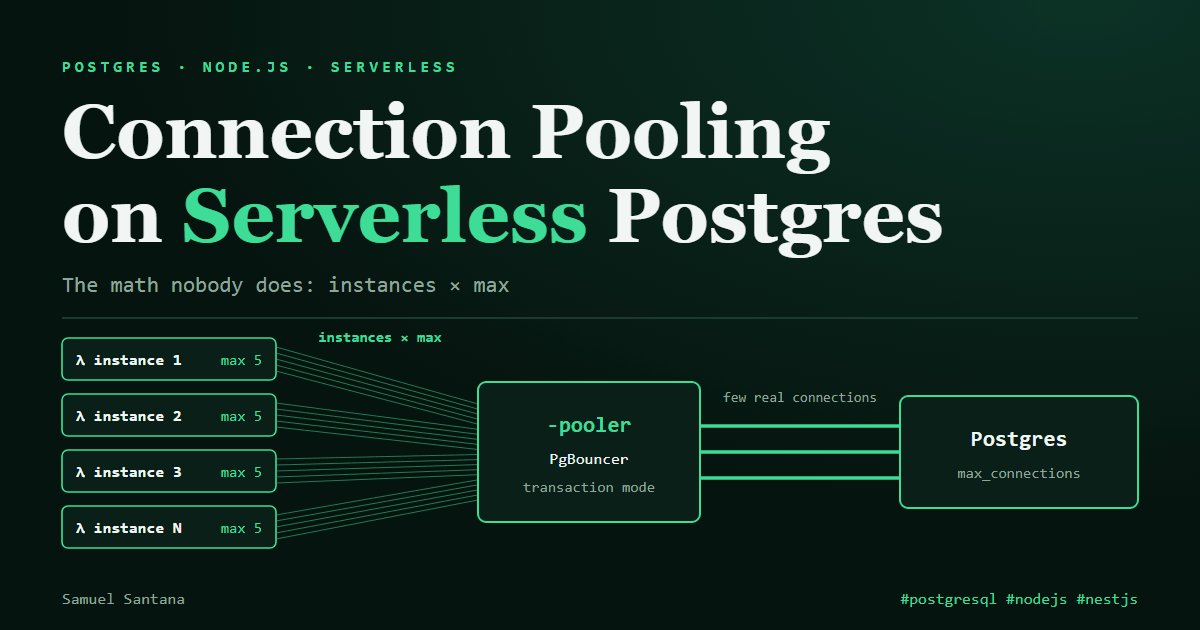
In serverless, every instance opens its own pool. On standard Lambda (without Managed Instances), each execution environment serves one request at a time and keeps its pool frozen between invocations. With 50 concurrent environments, each with a pool of 10 connections because that is postgres.js's default, you just allowed up to 500 connections to the database. The same holds, on a smaller scale, for a NestJS app with several replicas scaling horizontally.
The math:
(maximum concurrent instances) × (pool size per instance)has to stay below the database'smax_connections, with a margin. If you have never done this math, you will probably blow the limit at a traffic peak that hasn't happened yet.
Why There Is a Pooler in Front of the Database
The standard answer is for the application not to talk to Postgres directly, but to a connection pooler. PgBouncer is the best known; Neon and Supabase offer a managed one, usually on a separate endpoint. On Neon, it is the hostname with the -pooler suffix.
The pooler keeps a few real connections to Postgres and multiplexes hundreds of the application's logical connections over them. To the API, connections look unlimited; in practice, the pooler is juggling behind the scenes. And the math from the previous section moves: instances × max now runs into the pooler's client limit, which is much higher, and the physical limit becomes the pooler's own pool.
The detail that catches everyone is the pooling mode:
- Session mode: the client's connection is tied to a real connection until it disconnects. It behaves like a direct connection and does not solve scale.
- Transaction mode: the real connection belongs to your session only during a transaction. When it ends, the connection goes back to the pool and can serve another client. This is the mode of Neon's
-poolerendpoint, because it is what actually allows multiplexing.
Transaction mode has a price: whatever lives in the session, not in the transaction, is lost between one transaction and the next. SET, LISTEN/NOTIFY, session advisory locks and temporary tables stop behaving the way you expect. Before switching the URL, check that the application depends on none of them. In vertex-api, that check is written down in the code itself: none of them is used, and the three places that open a transaction do all their work inside it.
Prepared Statements: the Old Advice, and Why I Turn Them Off Anyway
Postgres protocol-level prepared statements also live on the physical connection, not on your logical session. If the driver prepares a query in one transaction and the next transaction lands on another physical connection, Postgres complains that the statement does not exist. If the name collides with another client's, it complains that it already exists. Both errors have the same cause.
For years the advice was simple: behind a pooler in transaction mode, turn prepared statements off. That advice has aged. PgBouncer 1.21, from 2023, started tracking protocol-level prepared statements (the max_prepared_statements option) and recreating them on whichever connection the next transaction lands on; since 1.24 this is on by default. Neon's pooler tracks them. What still breaks is a PREPARE written in SQL, which PgBouncer cannot see.
Even so, vertex-api runs with prepare: false, because here being wrong is asymmetric. If the driver's statement cache and the pooler's disagree, the symptom only shows up under pooling, only in production and only now and then, as a prepared statement ... does not exist or already exists. In postgres-js, turning them off costs more than a parse: without a named statement, every query with parameters pays an extra round trip (Parse/Describe, and only then Bind/Execute). And with Drizzle the option changes nothing: Drizzle's driver runs every query through sql.unsafe(), which in postgres-js already skips prepared statements by default. So the option stays as a safeguard, not an optimization: it protects any query that someday uses postgres-js directly, outside Drizzle. Turning it back on only makes sense when a measurement says it matters.
// vertex-api: options for every postgres-js connection the app opens
import type { Options } from 'postgres';

export const postgresClientOptions: Options<Record<string, never>> = {
  // Asymmetric risk: one extra round trip per parameterized query against an intermittent, production-only bug.
  prepare: false,
  // Behind the pooler, this pool only covers one process's in-flight queries.
  // What reaches Neon is instances × max.
  max: 5,
  // Seconds: idle connections are returned instead of held for the life of the process.
  idle_timeout: 20,
};
The full file, with the reasoning for each option in a comment, is in vertex-api.
Other tools make the same decision under another name:
- Prisma: for a long time the fix was the
?pgbouncer=trueURL parameter, which turns protocol-level prepared statements off. Prisma's documentation now recommends not using it with PgBouncer 1.21 or newer and enablingmax_prepared_statementson the pooler instead. - node-postgres (
pg): only uses named prepared statements when you ask for them (query({ name, text, values })). That makes it safe by accident, and it also misses the plan cache a named statement would give you on a direct connection.
The common thread: the right driver configuration depends on knowing in advance whether there is a pooler in transaction mode in the path, and which version of it. Copying the configuration of a project with self-hosted Postgres and no pooler into a project on Neon or Supabase is a recipe for this bug.
Two URLs, Two Purposes
The practice that became consensus, popularized by Prisma but useful with any ORM, is to split the connection URL in two:
# .env
# Used by the application at runtime: goes through the pooler,
# many logical connections, few physical ones.
DATABASE_URL="postgresql://user:pass@ep-xxx-pooler.sa-east-1.aws.neon.tech/db?sslmode=require"

# Used only by migrations and admin scripts:
# a direct connection, no pooler.
DIRECT_URL="postgresql://user:pass@ep-xxx.sa-east-1.aws.neon.tech/db?sslmode=require"
The application uses DATABASE_URL, through the pooler. The migration pipeline (drizzle-kit migrate, prisma migrate deploy) uses DIRECT_URL. Migration tools tend to depend on exactly what transaction mode does not keep: Prisma Migrate, for example, holds a session advisory lock for the whole migration, and in transaction mode that session does not exist.
How to Catch It Before It Becomes an Incident
Don't wait for the production error to find the limit. Postgres itself shows it:
-- How many connections are open right now, by state
SELECT state, count(*) FROM pg_stat_activity GROUP BY state;

-- The configured ceiling
SHOW max_connections;
Behind a pooler, pg_stat_activity shows the pooler's connections, not the application's. The application's side shows up in the pooler's metrics and in Neon's or Supabase's connections chart. That chart is the first place to look when the API starts returning intermittent errors under load that "make no sense". If the connections curve climbs in a sawtooth until it hits the ceiling exactly when the errors appear, you found the cause before opening a single stack trace.
What Stays
Serverless didn't remove the classic connection pooling problem; it only changed the math. The question stopped being "how many connections does my process need" and became "how many connections do all the instances that can exist at the same time need". That math almost never shows up in "connect your Next.js or NestJS app to Postgres in 5 minutes" tutorials.
Treat a database connection as a scarce resource shared by every concurrent invocation of the application, not as a per-instance configuration detail. And be wary of configuration advice without a date: the prepared statements one held until late 2023 and still circulates as a rule.
Comments
Loading comments...