The Angular Renaissance: Signals and the New HTTP Approach
 Samuel Santana
If you follow the Angular ecosystem closely, you know the framework is going through its biggest renaissance since the AngularJS-to-Angular-2 rewrite. With versions 16 and 17 landing, and consolidation through the most recent releases (18 to 22), Google changed the rules of the game.
The focus now is clear: Developer Experience (DX), performance, and less boilerplate. And at the center of this shift are two fundamental pieces: Signals and the modernization of HttpClient.
In this article, we'll dissect how these tools change the way we architect scalable applications.
What are Signals, and why should you care?
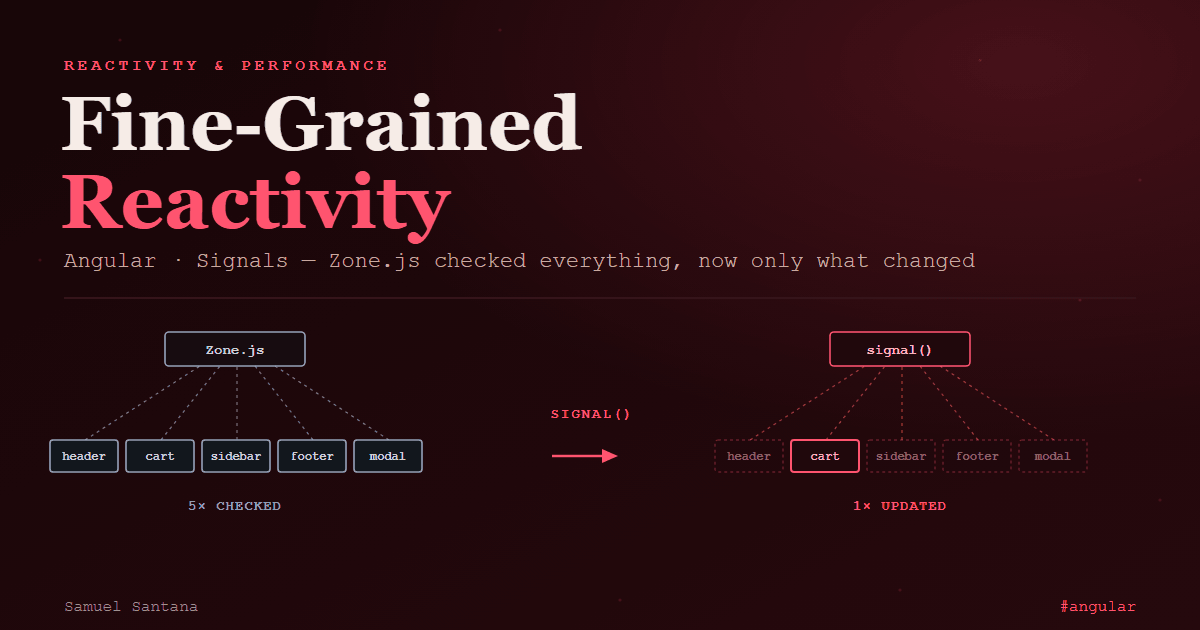
For years, Angular relied on Zone.js to detect changes. The problem? Zone.js is a "sledgehammer." It intercepts async events (clicks, timeouts, HTTP requests) and, just in case, checks the entire component tree to see if something changed — at least the components using the Default strategy (now Eager); OnPush ones are skipped unless marked. In complex applications — like multi-tenant SaaS platforms with dense data dashboards — this creates performance bottlenecks.
Signals bring fine-grained reactivity. A Signal is a wrapper around a value that notifies consumers only when that value actually changes. The framework now knows which components read that Signal and marks only those for update, without depending on Zone.js to find out that something changed.
The 3 Pillars of Signals:
signal(): the basic mutable state.computed(): pure derived state. It's only recalculated if the Signals it depends on change, and the value is cached (memoized).effect(): side effects (like saving to localStorage or syncing an imperative library; for touching the DOM after rendering, the recommended API isafterRenderEffect()) that run automatically when their dependencies change.
Practical example:
import { Component, signal, computed, effect } from '@angular/core';
import { CurrencyPipe } from '@angular/common';

@Component({
  selector: 'app-cart',
  imports: [CurrencyPipe],
  standalone: true,
  template: `
    <div>
      <p>Quantity: {{ quantity() }}</p>
      <p>Total Price: {{ totalPrice() | currency }}</p>
      <button (click)="increment()">Add Item</button>
    </div>
  `
})
export class CartComponent {
  // Basic state
  quantity = signal(1);
  unitPrice = 50.00;

  // Derived state (only recalculates when quantity changes)
  totalPrice = computed(() => this.quantity() * this.unitPrice);

  constructor() {
    // Side effect focused on observability/debugging
    effect(() => {
      console.log(`Cart value changed to: ${this.totalPrice()}`);
    });
  }

  increment() {
    this.quantity.update(q => q + 1);
  }
}
Use Cases and Advantages
- Key advantage: predictability and performance. It is not the end of
ExpressionChangedAfterItHasBeenCheckedError, though: the docs warn that propagating state througheffect()can still trigger it. - Use cases: complex local state management, dynamic forms, and highly interactive interfaces (like real-time dashboards).
The New HTTP Approach: Goodbye Modules, Hello Fetch API
Alongside reactivity, how Angular handles dependency injection and network requests has evolved too. The old HttpClientModule is being left behind in the age of Standalone Components.
Starting with Angular 15 (and standardized as of 17+), the recommendation is to use provideHttpClient(). More than a syntax change, this new API brought withFetch().
The power of withFetch()
Historically, HttpClient used the XMLHttpRequest API under the hood. By enabling withFetch() (Angular 16.1 through 21), Angular uses the native Fetch API. In Angular 22, fetch became the default backend and withFetch() was deprecated: provideHttpClient() is enough, and withXhr() exists for anyone who needs upload progress, which the Fetch API doesn't report. For Server-Side Rendering (SSR) or Static Site Generation (SSG), use fetch: XHR support on the server is deprecated.
// app.config.ts
import { ApplicationConfig } from '@angular/core';
import { provideHttpClient, withFetch } from '@angular/common/http';

export const appConfig: ApplicationConfig = {
  providers: [
    provideHttpClient(withFetch()) // Angular 16.1–21; on 22+, provideHttpClient() is enough
  ]
};
Bridging Both Worlds: RxJS vs Signals
The question every tech recruiter or tech lead asks today is: "Are Signals going to kill RxJS?"
A senior engineer's answer is: No. They solve different problems.
RxJS excels at handling async events over time (like input debouncing or WebSockets). Signals, on the other hand, are perfect for synchronous state. The beauty of modern Angular is in the interoperability. With the @angular/core/rxjs-interop package, we can make HTTP requests (which return Observables) and turn them into Signals elegantly with toSignal:
import { Component, inject } from '@angular/core';
import { HttpClient } from '@angular/common/http';
import { toSignal } from '@angular/core/rxjs-interop';

interface User {
  id: number;
  name: string;
}

@Component({
  selector: 'app-user-profile',
  standalone: true,
  template: `
    @if (user(); as user) {
      <h1>{{ user.name }}</h1>
    } @else {
      <p>Loading...</p>
    }
  `
})
export class UserProfileComponent {
  private http = inject(HttpClient);

  // Turns the HTTP request's Observable directly into a Signal
  user = toSignal(this.http.get<User>('/api/user/1'));
}
Note: Angular 17+'s new Control Flow syntax (@if, @for) pairs perfectly with Signals.
For reactive reads like this one, Angular 22 stabilized httpResource() (from @angular/common/http): it issues the request through HttpClient itself (interceptors included), exposes value(), isLoading() and error() as Signals, and cancels the pending request when the reactive URL changes. For mutations (POST, PUT), the docs recommend using HttpClient directly.
Conclusion
Software engineering is about adopting the right patterns to solve scale bottlenecks. The mental shift to Signals and the new HttpClient with Fetch API aren't just "hype." They're tangible tools that reduce developer cognitive load and, with zoneless mode (the default since Angular 21), take Zone.js out of the bundle and cut unnecessary change detection cycles.
Comments
Loading comments...