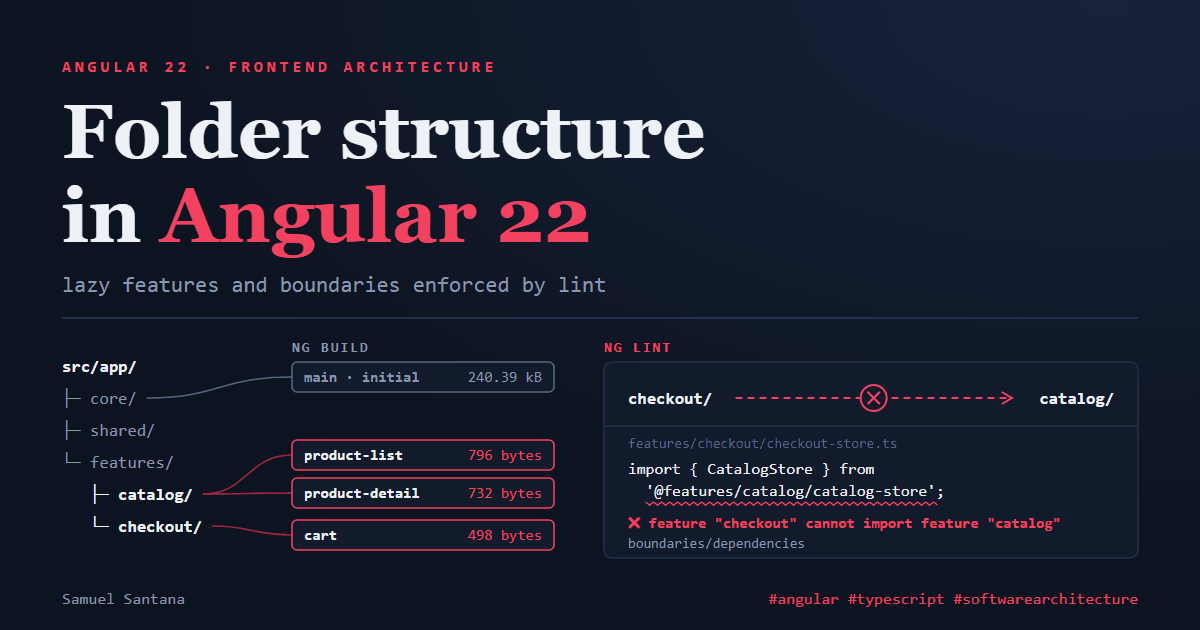
Angular 22 folder structure: lazy features and boundaries enforced by lint
 Samuel Santana
In July I wrote an overview of folder architecture for React, Angular and Node.js. The Angular part aged badly. It recommended checkout.component.ts and auth.guard.ts, components/ and services/ folders inside each feature and a global data-access/ folder. Angular had already changed some of that by the time the post went out; the rest I had never tested.
This time I didn't trust memory. I generated a project with Angular CLI 22.2.0, the latest version today (released on September 23), and ran every claim through ng build, ng test or ng lint. What follows is the output of those commands or the text of the official docs. When something is my opinion, I say so.
What CLI 22.2 generates, and why the names changed
ng new with routing and without SSR creates this inside src/:
src/
├─ index.html
├─ main.ts
├─ styles.css
└─ app/
   ├─ app.ts
   ├─ app.html
   ├─ app.css
   ├─ app.spec.ts
   ├─ app.config.ts
   └─ app.routes.ts
No app.component.ts, no AppModule. The root component is the class App, with no standalone: true in the decorator, because standalone has been the default since Angular 19 (the 19.0.0 changelog says: "Angular directives, components and pipes are now standalone by default"). NgModules did not end: they are still documented, under the "Extended Ecosystem" section of angular.dev. They just stopped being the default path.
Then I ran ng generate for each kind of artifact. The result:
ng generate | File created | Exported symbol |
|---|---|---|
component product-list | product-list.ts (+ .html, .css, .spec.ts) | ProductList |
service product-api | product-api.ts | ProductApi |
directive autofocus | autofocus.ts | Autofocus |
pipe currency-brl | currency-brl-pipe.ts | CurrencyBrlPipe |
guard auth | auth-guard.ts | authGuard |
interceptor auth-token | auth-token-interceptor.ts | authTokenInterceptor |
resolver product | product-resolver.ts | productResolver |
There is a pattern. Component, directive and service lost the type from both the file name and the class. Pipe, guard, interceptor and resolver kept the type, but separated by a hyphen, not a dot. That follows the current style guide: "Separate words within a file name with hyphens" and "When the file contains a TypeScript class, the file name should reflect that class name". ng new --help itself describes both conventions: the "2025" guide (the default) uses app.ts; the "2016" one puts the type in the name, app.component.ts. The --file-name-style-guide=2016 option has existed on ng new since CLI 21, for anyone who wants the old format in a new project.
If your CLI still generates .component.ts
It's not a bug. When the convention changed, in v20, ng update started running a migration that writes defaults into angular.json so existing projects keep generating the old names. According to the commit description, these are the values:
{
  "@schematics/angular:component": { "type": "component" },
  "@schematics/angular:directive": { "type": "directive" },
  "@schematics/angular:service": { "type": "service" },
  "@schematics/angular:guard": { "typeSeparator": "." },
  "@schematics/angular:interceptor": { "typeSeparator": "." },
  "@schematics/angular:module": { "typeSeparator": "." },
  "@schematics/angular:pipe": { "typeSeparator": "." },
  "@schematics/angular:resolver": { "typeSeparator": "." }
}
The list explains the table: type brings the suffix back for the first three, and typeSeparator brings the dot back for the other five. If your project came through successive updates, look for the schematics key in angular.json before blaming the CLI. Renaming a whole codebase is a separate decision, and I wouldn't make it for looks alone: the guide puts consistency within a file above any of its own rules.
The @Service() that CLI 22 generates
The generated product-api.ts doesn't use @Injectable:
import { Service } from '@angular/core';

@Service()
export class ProductApi {}
@Service landed in Angular 22.0.0, in June, according to the changelog. The services documentation defines it as "a modern, ergonomic shorthand for the traditional @Injectable({ providedIn: 'root' }) syntax": a singleton, available across the application, and tree-shakable. The same page has the difference that matters in practice: @Service does not support constructor injection, only inject(). For route or component scope there is @Service({ autoProvided: false }), which turns off automatic registration and requires an explicit providers entry. That detail comes back later, because it decides where a feature's state lives.
The tree I use
This is the final project, with two features (catalog and checkout), all of it verified by build, tests and lint:
src/app/
├─ app.ts  app.html  app.css  app.config.ts  app.routes.ts
├─ core/
│  ├─ auth/
│  │  ├─ auth-session.ts          # @Service(): who is signed in
│  │  └─ auth-guard.ts            # canMatch for the checkout route
│  └─ http/
│     └─ auth-token-interceptor.ts
├─ shared/
│  ├─ products/
│  │  └─ product.ts               # type used by both features
│  └─ ui/
│     └─ currency-brl-pipe.ts
└─ features/
   ├─ catalog/
   │  ├─ catalog.routes.ts        # default export of the feature's routes
   │  ├─ catalog-store.ts         # route-scoped state
   │  ├─ product-api.ts
   │  ├─ product-list/            # .ts, .html, .css and .spec.ts together
   │  └─ product-detail/
   └─ checkout/
      ├─ checkout.routes.ts
      ├─ checkout-store.ts
      └─ cart/
Three style guide rules hold this shape up. "Organize your project into subdirectories based on the features of your application", and explicitly: "avoid creating directories like components, directives, and services". A component's files stay together, and the test sits next to the code ("Unit tests should live in the same directory as the code-under-test"). And no utils.ts: the guide asks you to "Avoid overly generic file names like helpers.ts, utils.ts, or common.ts".
core/, shared/ and features/ are not in the guide. They are my convention, and the reason is concrete: each of those folders becomes an element type in the lint rule shown further down. A folder that no rule targets is decoration. core/ holds what the whole application needs from the first load. shared/ holds what doesn't know any feature exists. features/ groups the slices that load on demand.
The name catalog.routes.ts, with a dot, mirrors the app.routes.ts the CLI itself generates.
Lazy per feature: the folder becomes a chunk
The application routes only point at the features:
// app.routes.ts
export const routes: Routes = [
  { path: '', pathMatch: 'full', redirectTo: 'catalog' },
  { path: 'catalog', loadChildren: () => import('@features/catalog/catalog.routes') },
  { path: 'checkout', canMatch: [authGuard], loadChildren: () => import('@features/checkout/checkout.routes') },
];
Each feature exports its own routes as default, which removes the need for .then(). The loading strategies documentation says: "If the lazily loaded file uses a default export, you can return the import() promise directly".
// features/catalog/catalog.routes.ts
export default [
  {
    path: '',
    providers: [CatalogStore],
    children: [
      { path: '', loadComponent: () => import('./product-list/product-list').then((m) => m.ProductList) },
      { path: ':id', loadComponent: () => import('./product-detail/product-detail').then((m) => m.ProductDetail) },
    ],
  },
] satisfies Routes;
The production ng build shows the result:
Initial chunk files          | Names           |  Raw size | Estimated transfer size
main-SGQLTLX3.js             | main            | 240.39 kB |                64.96 kB

Lazy chunk files             | Names           |  Raw size | Estimated transfer size
chunk-CsoRDU0D.js            | product-list    | 796 bytes |               796 bytes
chunk-CUGTxQp-.js            | product-detail  | 732 bytes |               732 bytes
chunk-BavZ1Hy7.js            | catalog-routes  | 634 bytes |               634 bytes
chunk-iqYSogQM.js            | checkout-routes | 524 bytes |               524 bytes
chunk-Dny5jqu0.js            | cart            | 498 bytes |               498 bytes
chunk-B-WAw2NO.js            | -               | 302 bytes |               302 bytes
chunk-DX5tK5oh.js            | -               | 274 bytes |               274 bytes
Searching the output files for each class shows where everything went. CatalogStore is in the catalog-routes chunk, next to the route that provides it. ProductApi, a root-scoped @Service(), is in a shared lazy chunk (the 302-byte one), not in main. The docs promise that a root service nobody uses stays out of the bundle; the build shows the next step: a root service used only by lazy features travels with them. "Provided in root" does not mean "in the initial bundle". The currency pipe, used by three lazy components, ended up in the other shared chunk. And AuthSession is in main, because the guard that uses it runs in app.routes.ts, before any feature loads.
canMatch doesn't download the feature; canActivate does
The checkout route uses canMatch, not canActivate, and the difference is measurable. In a test with RouterTestingHarness, I counted how many times loadChildren runs when the guard denies access:
let loads = 0;
const loadFeature = () => {
  loads++;
  return [{ path: '', component: Home }];
};

it('canMatch: the lazy loader never runs', async () => {
  expect(await visitWith([{ path: 'feature', canMatch: [() => false], loadChildren: loadFeature }])).toBe(0);
});

it('canActivate: the lazy loader runs anyway', async () => {
  expect(await visitWith([{ path: 'feature', canActivate: [() => false], loadChildren: loadFeature }])).toBe(1);
});
Both pass. With canActivate, the feature's code is loaded even though the guard denies access. One detail the test surfaced: without a ** fallback route, a rejected canMatch ends in NG04002: Cannot match any routes. The guards documentation explains why: when canMatch returns false, "Angular tries other matching routes instead of completely blocking navigation". If no other route matches, navigation fails. That's why this project's authGuard returns a UrlTree to /catalog instead of false.
The barrel that undoes lazy loading
The July post, in its React section, argued for an index.ts at the root of each feature as its "public API". Before bringing that idea to Angular, I tested it here. I created features/catalog/index.ts re-exporting CatalogStore, ProductList and ProductDetail, and made App import only the store through it:
// features/catalog/index.ts
export { CatalogStore } from './catalog-store';
export { ProductList } from './product-list/product-list';
export { ProductDetail } from './product-detail/product-detail';

// app.ts
import { CatalogStore } from '@features/catalog';
The build changed like this:
Import in App | product-list (lazy) | product-detail (lazy) | Where the component code is |
|---|---|---|---|
'@features/catalog' (barrel) | 122 bytes | 122 bytes | in the initial bundle |
'@features/catalog/catalog-store' | 774 bytes | 738 bytes | in the lazy chunks |
With the barrel, the code of both components moved to the initial bundle, and the lazy chunks became 122-byte shells. Importing the file directly, they stayed lazy. In this toy project that's a few hundred bytes; in a real feature, it's the whole feature moving into the first load without anyone noticing, because the route still has loadComponent and the code looks right. I didn't investigate why the bundler didn't drop the unused components. The result is enough for the decision: in a lazy feature, I don't put a barrel at the root.
Where state lives
The providers documentation lists three places to register a dependency: at application bootstrap, on a component or directive, and on a route. On top of those there is automatic root registration, which is what @Service() does with no configuration at all.
Root scope (@Service()). One instance for the whole application. That's where AuthSession and ProductApi live. No providers entry needed, and the code goes to the chunk of whoever uses it, as the build showed.
Route scope (@Service({ autoProvided: false }) plus providers on the route). That's where CatalogStore lives:
@Service({ autoProvided: false })
export class CatalogStore {
  private readonly api = inject(ProductApi);
  readonly products = signal<readonly Product[]>(this.api.list());
}
The docs guarantee that route-provided services "are available to all components and directives within that route, as well as to its guards and resolvers". autoProvided: false is what prevents use outside of it. A test with both variants shows the difference: outside any route, a plain @Service() silently resolves from the root injector, with an instance that isn't the feature's; @Service({ autoProvided: false }) fails with NG0201: No provider found. I prefer the error.
Component scope (providers on @Component). The instance is born and dies with the component: "when the component gets destroyed, the provided service is also destroyed as well". It fits form or modal state, not feature state.
The route injector doesn't die when you leave the route
This behavior surprised me. I wrote a test that enters a route with its own provider, leaves to another route and comes back, counting how many instances were created and destroyed:
let created = 0;
let destroyed = 0;

@Service({ autoProvided: false })
class FeatureStore {
  constructor() {
    created++;
    inject(DestroyRef).onDestroy(() => destroyed++);
  }
}

async function enterLeaveAndReturn(...features) {
  TestBed.configureTestingModule({ providers: [provideRouter(routes, ...features)] });
  const harness = await RouterTestingHarness.create();
  await harness.navigateByUrl('/feature');
  await harness.navigateByUrl('/elsewhere');
  const destroyedAfterLeaving = destroyed;
  await harness.navigateByUrl('/feature');
  return { destroyedAfterLeaving, created };
}

it('outlive the route by default', async () => {
  expect(await enterLeaveAndReturn()).toEqual({ destroyedAfterLeaving: 0, created: 1 });
});

it('are destroyed on leave with withAutoCleanupInjectors (and recreated on return)', async () => {
  expect(await enterLeaveAndReturn(withAutoCleanupInjectors())).toEqual({ destroyedAfterLeaving: 1, created: 2 });
});
Both pass. By default, the route's store stays alive after the user leaves, with whatever state it had. Coming back finds the same instance. That may be exactly what you want (a catalog filter that survives) or a silent leak (a heavy store that is never collected).
withAutoCleanupInjectors() was stabilized in Angular 22.2.0, released on September 23; until then it existed as withExperimentalAutoCleanupInjectors(), which is now marked deprecated. The API reference describes the behavior: the router destroys the EnvironmentInjectors of routes that are no longer active or stored by the RouteReuseStrategy. The condition is RouteReuseStrategy.shouldDestroyInjector returning true. I checked the @angular/router 22.2.0 source: the default strategy returns true, so with the default strategy, turning the feature on is enough. With a custom strategy, you have to implement that method, and also retrieveStoredRouteHandles if it stores routes for reuse.
The cost shows up in the second test: created: 2. With cleanup on, coming back to the route creates another store, and the previous state is gone. I decide per feature. State that is expensive and that users expect to find again lives at the root, on purpose, not in the route by accident.
Boundaries: the folder enforces nothing, lint does
Folders mean nothing to the compiler. To prove it, I made CheckoutStore import the catalog's CatalogStore and ProductApi, one through the alias and the other through a relative path. ng build finished normally. The boundary between features only exists if some tool checks it.
I used eslint-plugin-boundaries 7.2.0 on top of the ESLint setup that angular-eslint configures. Each folder becomes an element type, and policies say who can import whom:
{
  files: ['src/**/*.ts'],
  plugins: { boundaries },
  settings: {
    'import/resolver': { typescript: { alwaysTryTypes: true } },
    'boundaries/elements': [
      { type: 'feature', pattern: 'src/app/features/*', capture: ['feature'] },
      { type: 'core', pattern: 'src/app/core' },
      { type: 'shared', pattern: 'src/app/shared' },
    ],
    'boundaries/files': [{ category: 'shell', pattern: 'src/app/*.ts' }],
  },
  rules: {
    'boundaries/dependencies': ['error', {
      default: 'disallow',
      message: '{{from.element.types}} cannot import {{to.element.types}}',
      policies: [
        { from: { file: { categories: 'shell' } }, allow: { to: { file: { categories: 'shell' } } } },
        { from: { file: { categories: 'shell' } }, allow: { to: { element: { types: { anyOf: ['feature', 'core', 'shared'] } } } } },
        { from: { element: { type: 'core' } }, allow: { to: { element: { type: 'shared' } } } },
        { from: { element: { type: 'feature' } }, allow: { to: { element: { types: { anyOf: ['core', 'shared'] } } } } },
        {
          from: { element: { type: 'feature' } },
          disallow: { to: { element: { type: 'feature' } } },
          message: 'feature "{{from.element.captured.feature}}" cannot import feature "{{to.element.captured.feature}}"; move what both need to shared/',
        },
        // Last on purpose: the last matching policy wins, and this one covers files inside the same element.
        { allow: { dependency: { relationship: { to: 'internal' } } } },
      ],
    }],
  },
}
The order of the policies is not cosmetic. The plugin's documentation says "the final result is determined by the last matching policy". The rule that forbids a feature from importing a feature would also match imports inside the same feature; the internal-dependencies policy comes after it to win in that case. capture: ['feature'] is what lets the message say which feature imported which. And there is no policy for @angular/* or other npm packages because none is needed: according to the migration guide, "by default, boundaries/dependencies only checks dependencies whose target module origin is local". I had written a policy allowing external packages; I removed it, and lint kept passing.
With the forbidden imports in place, ng lint answered:
src\app\core\auth\core-leak.ts
  1:28  error  core cannot import feature  boundaries/dependencies

src\app\features\checkout\checkout-store.ts
  3:30  error  feature "checkout" cannot import feature "catalog"; move what both need to shared/  boundaries/dependencies
  4:28  error  feature "checkout" cannot import feature "catalog"; move what both need to shared/  boundaries/dependencies

src\app\shared\ui\leak.ts
  1:31  error  shared cannot import feature  boundaries/dependencies

✖ 4 problems (4 errors, 0 warnings)
The @features/catalog/... alias and the ../catalog/... relative path were caught the same way. Dynamic imports count too: when I removed the policy that allows the shell, lint flagged the import() lines in app.routes.ts.
Two notes on version 7, for anyone copying configuration from older examples. The mode option on elements is deprecated: lint warns and tells you to use boundaries/files instead of mode: 'file', which is what the configuration above does for the files at the root of app/. And, according to the v6 to v7 migration guide, the rule's rules option was renamed to policies, and the presets now only enable boundaries/dependencies; the old boundaries/element-types was already deprecated.
When checkout needs the product
The error says to move what both features need into shared/, and the question is what to move. In this project, checkout only needed the shape of a product, so that's what moved up: the Product interface, in shared/products/product.ts. CatalogStore and ProductApi stayed in the catalog. My rule is to move up the smallest thing that solves the problem. If what both features need is a whole store, I question how the features are split before I move the store.
Path aliases without baseUrl
The @core, @shared and @features aliases live in tsconfig.json without baseUrl:
"paths": {
  "@core/*": ["./src/app/core/*"],
  "@shared/*": ["./src/app/shared/*"],
  "@features/*": ["./src/app/features/*"]
}
That's not a preference. The generated project uses TypeScript 6.0, and when I added "baseUrl": "./", tsc refused it:
error TS5101: Option 'baseUrl' is deprecated and will stop functioning in TypeScript 7.0.
Specify compilerOption '"ignoreDeprecations": "6.0"' to silence this error.
The TypeScript 6.0 release notes explain that baseUrl also acted as a lookup root for module resolution, which made imports that would never work at runtime look valid, and tell you to put the prefix directly in each paths entry. On the lint side, eslint-import-resolver-typescript "automatically detects custom path mappings defined in your tsconfig", according to the plugin's documentation, so lint and the compiler see the same paths.
What changed since the July post
- Names:
checkout.component.tsandauth.guard.tsbecamecheckout.tsandauth-guard.tsin new projects since v20. In existing ones, the migration kept the old format throughangular.json. - Folders by type inside a feature:
components/andservices/are exactly what the guide asks you to avoid. - A global
data-access/: data access stays inside the feature that uses it; only what two features need moves up toshared/. - A barrel at the feature root (argued for in the React section): in a lazy Angular feature, as measured above, it pulls code that should be lazy into the initial bundle.
- "Private" boundaries: the post said a feature's components were private. Without lint, that's only an intention.
Why this matters
A folder structure is a claim about dependencies: what lives in features/checkout does not depend on features/catalog, and what lives in shared/ depends on no feature at all. Nobody checks that claim by default. The compiler accepts any import, the build stays green, and the structure comes apart one import at a time until the folders are just names.
What keeps the claim true is three checks. The ng build output shows one chunk per feature, and a barrel or a wrong import shows up there as a shrunken chunk. The boundaries lint, running in CI, breaks the pull request that crosses features. And file names follow what the CLI generates, so the next ng generate doesn't start a second pattern in the middle of the first. The rest, core or shared, features/ or not, is convention. Pick yours, but turn on the three checks.
References
- Angular — Style Guide
- Angular — Creating and using services (
@Service) - Angular — Defining dependency providers
- Angular — Route loading strategies
- Angular — Route guards
- Angular —
withAutoCleanupInjectorsAPI - Angular —
RouteReuseStrategyAPI - Angular —
ng new - Angular — CHANGELOG (19.0.0, 22.0.0, 22.2.0)
- Angular CLI — "keep previous style guide generation behavior" migration (v20)
- TypeScript 6.0 — release notes (
baseUrldeprecated) - eslint-plugin-boundaries — Policies
- eslint-plugin-boundaries — TypeScript support
- eslint-plugin-boundaries — v6 to v7 migration
Comments
Loading comments...